05 EKS Networking Lab: AWS Load Balancer Controller & NLB
EKS Study note
This lab is the continuation of 03 EKS Networking Lab 1 and 2. You need to provision an EKS cluster by following the instruction in the lab 1.
1. Provision AWS Load Balancer Controller
1.1. OIDC Provider Setting
Before provisioning the AWS Load Balancer Controller (LBC), you must set up an IAM OIDC provider for your cluster. This enables IAM Roles for Service Accounts (IRSA), which allows the LBC (running as a Pod) to securely authenticate with AWS APIs to manage load balancers (ALB/NLB) using a specific IAM role, rather than relying on broad permissions attached to the worker nodes.
Check if an OIDC provider already exists for your cluster:
aws iam list-open-id-connect-providers | grep $(aws eks describe-cluster --name myeks --query "cluster.identity.oidc.issuer" --output text | cut -d '/' -f 5)
"Arn": "arn:aws:iam::080403789922:oidc-provider/oidc.eks.us-east-1.amazonaws.com/id/EB53DEAA7B25D7AC731E272CA0873C5A"
If it doesn’t exist, create it:
eksctl utils associate-iam-oidc-provider --cluster myeks --approve
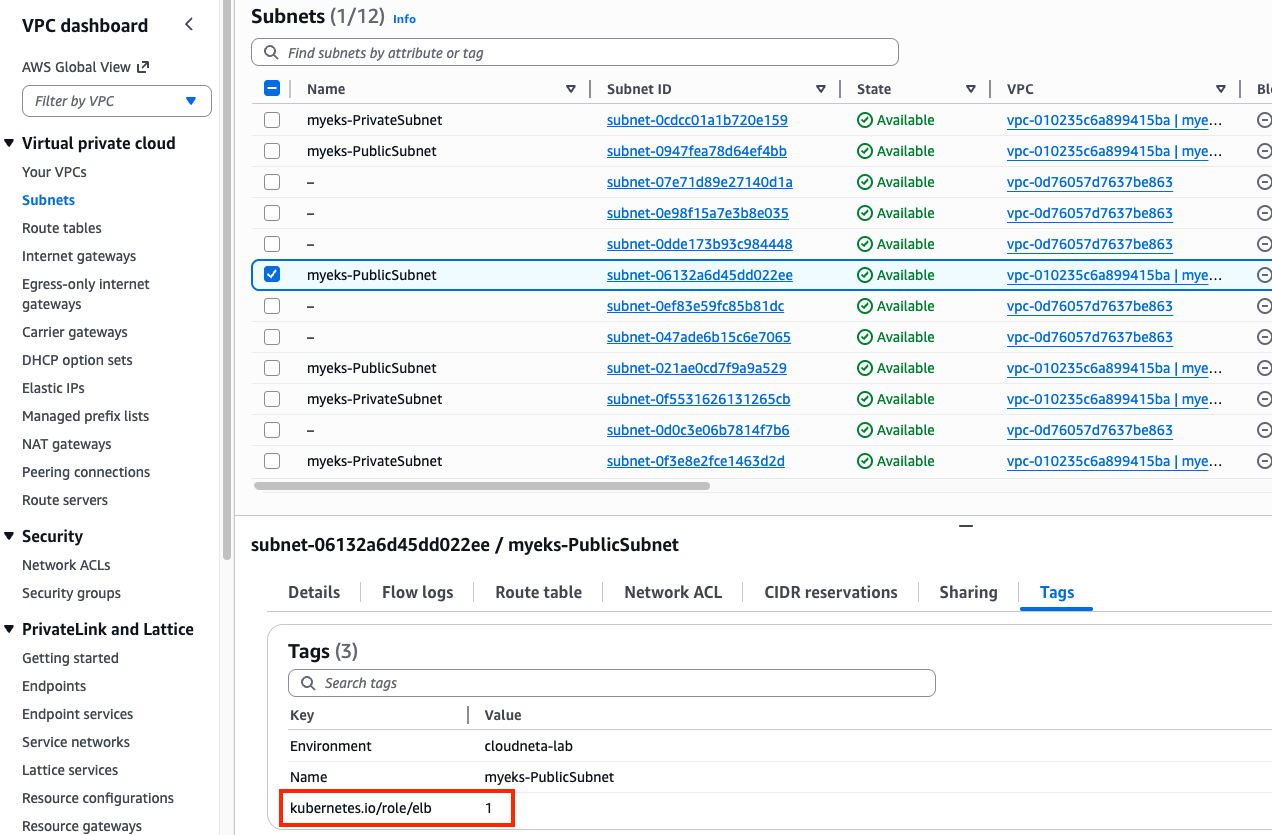
Search a public subnet to deploy ALB. kubernetes.io/role/elb=1 tag is already given to a public subnet.
aws ec2 describe-subnets --filters "Name=tag:kubernetes.io/role/elb,Values=1" --output table
1.2. IAM Policy Setting
Download IAM Policy json file:
curl -o aws_lb_controller_policy.json https://raw.githubusercontent.com/kubernetes-sigs/aws-load-balancer-controller/refs/heads/main/docs/install/iam_policy.json
cat aws_lb_controller_policy.json | jq
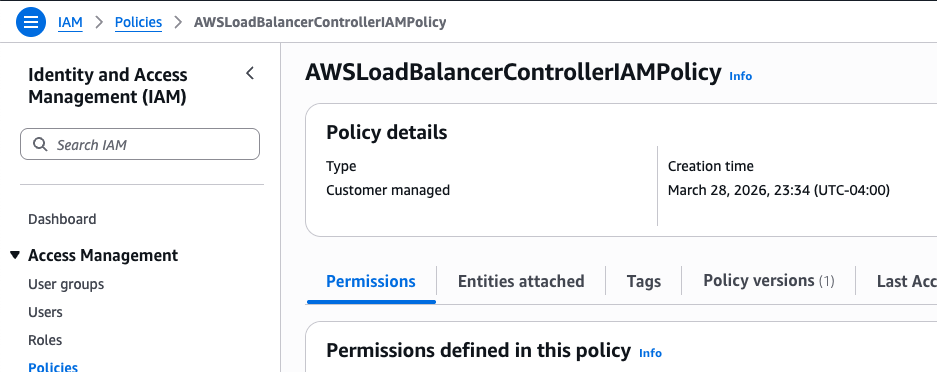
Create an IAM policy using the downloaded policy:
aws iam create-policy \
    --policy-name AWSLoadBalancerControllerIAMPolicy \
    --policy-document file://aws_lb_controller_policy.json
1.3. IRSA Setting
Confirm IRSA is not configured yet:
CLUSTER_NAME=myeks
eksctl get iamserviceaccount --cluster $CLUSTER_NAME
No iamserviceaccounts found

kubectl get serviceaccounts -n kube-system aws-load-balancer-controller
Error from server (NotFound): serviceaccounts "aws-load-balancer-controller" not found
Create two resources with the following command:
- aws-load-balancer-controller
ServiceAccountin kube-system namespace - IAM role for aws-load-balancer-controller
ServiceAccount. This is an AWS IAM resource.ACCOUNT_ID=$(aws sts get-caller-identity --query "Account" --output text) eksctl create iamserviceaccount \ --cluster=$CLUSTER_NAME \ --namespace=kube-system \ --name=aws-load-balancer-controller \ --attach-policy-arn=arn:aws:iam::$ACCOUNT_ID:policy/AWSLoadBalancerControllerIAMPolicy \ --override-existing-serviceaccounts \ --approve
Confirm the aws-load-balancer-controller ServiceAccount is created:
eksctl get iamserviceaccount --cluster $CLUSTER_NAME
NAMESPACE       NAME                            ROLE ARN
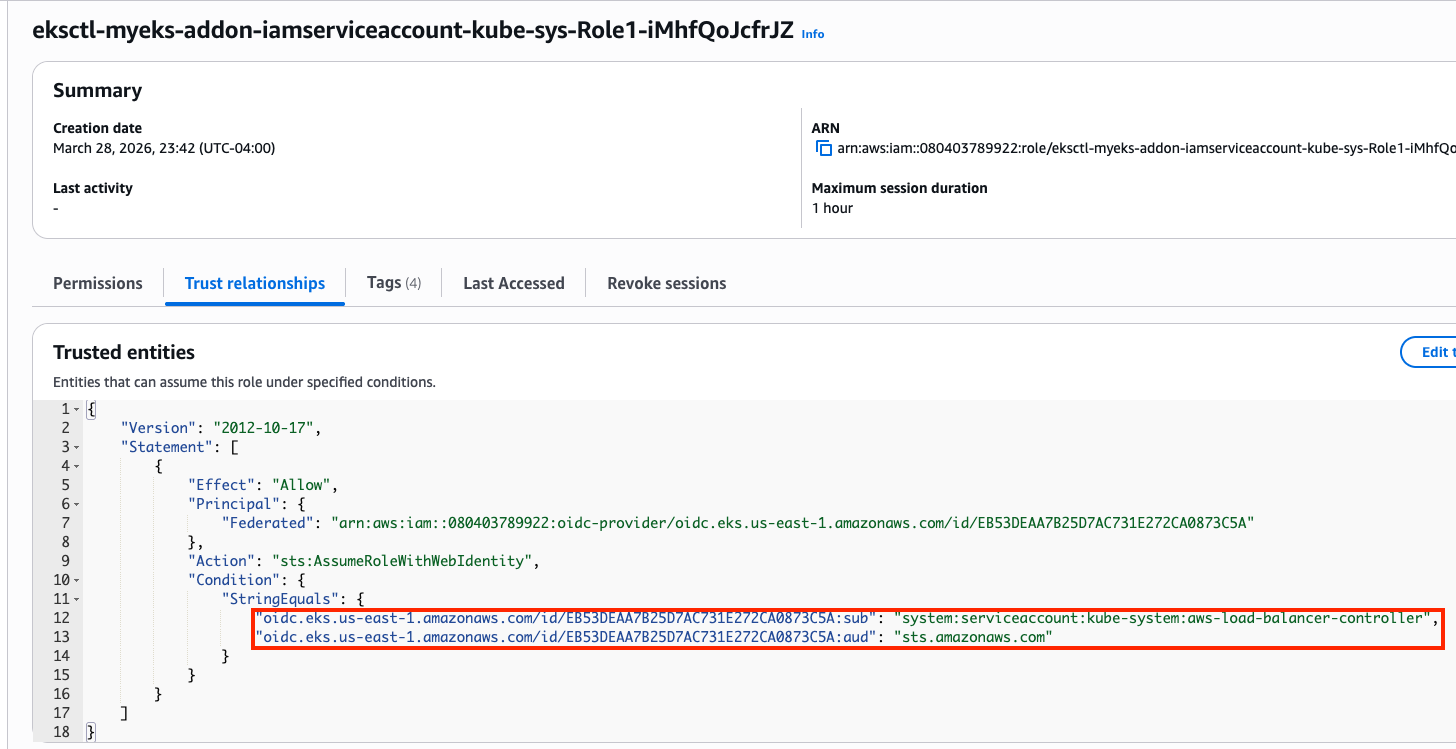
kube-system     aws-load-balancer-controller    arn:aws:iam::080403789922:role/eksctl-myeks-addon-iamserviceaccount-kube-sys-Role1-iMhfQoJcfrJZ

kubectl get serviceaccounts -n kube-system aws-load-balancer-controller -o yaml
apiVersion: v1
kind: ServiceAccount
metadata:
  annotations:
    eks.amazonaws.com/role-arn: arn:aws:iam::080403789922:role/eksctl-myeks-addon-iamserviceaccount-kube-sys-Role1-iMhfQoJcfrJZ
Confirm the above IAM role is created:
1.4. Install AWS Load Balancer Controller
Add helm chart repo:
helm repo add eks https://aws.github.io/eks-charts
helm repo update
Install AWS LBC using helm chart:
# https://artifacthub.io/packages/helm/aws/aws-load-balancer-controller
# https://github.com/aws/eks-charts/blob/master/stable/aws-load-balancer-controller/values.yaml
helm install aws-load-balancer-controller eks/aws-load-balancer-controller -n kube-system --version 3.1.0 \
  --set clusterName=$CLUSTER_NAME \
  --set serviceAccount.name=aws-load-balancer-controller \
  --set serviceAccount.create=false

NAME: aws-load-balancer-controller
LAST DEPLOYED: Sat Mar 28 23:57:55 2026
NAMESPACE: kube-system
STATUS: deployed
REVISION: 1
DESCRIPTION: Install complete
TEST SUITE: None
NOTES:
AWS Load Balancer controller installed!
Confirm:
helm list -n kube-system
NAME                            NAMESPACE       REVISION        UPDATED                                 STATUS          CHART                                   APP VERSION
aws-load-balancer-controller    kube-system     1               2026-03-28 23:57:55.894328 -0400 EDT    deployed        aws-load-balancer-controller-3.1.0      v3.1.0
...
Confirm pods are crashed:
kubectl get pod -n kube-system -l app.kubernetes.io/name=aws-load-balancer-controller
NAME                                            READY   STATUS             RESTARTS      AGE
aws-load-balancer-controller-7875649799-bq2vs   0/1     CrashLoopBackOff   2 (21s ago)   61s
aws-load-balancer-controller-7875649799-zvbns   0/1     CrashLoopBackOff   2 (23s ago)   61s
Check logs to understand why pods are crashed:
kubectl logs -n kube-system deployment/aws-load-balancer-controller
Found 2 pods, using pod/aws-load-balancer-controller-7875649799-bq2vs
{"level":"info","ts":"2026-03-29T03:59:59Z","msg":"version","GitVersion":"v3.1.0","GitCommit":"250024dbcc7a428cfd401c949e04de23c167d46e","BuildDate":"2026-02-24T18:21:40+0000"}
{"level":"error","ts":"2026-03-29T04:00:04Z","logger":"setup","msg":"unable to initialize AWS cloud","error":"failed to get VPC ID: failed to fetch VPC ID from instance metadata: error in fetching vpc id through ec2 metadata: get mac metadata: operation error ec2imds: GetMetadata, canceled, context deadline exceeded"}
Keyword is error in fetching vpc id through ec2 metadata. To allow AWS LBC to acquire VPC ID, there are two options. First, configure params for helm install
-set region=region-code-
-set vpcId=vpc-xxxxxxxx```bashget vpc id
terraform state show ‘module.vpc.aws_vpc.this[0]’ terraform show -json | jq -r ‘.values.root_module.child_modules[] | select(.address == “module.vpc”) | .resources[] | select(.address == “module.vpc.aws_vpc.this[0]”) | .values.id’ vpc-010235c6a899415ba
Don’t run it. We will use the second option.
helm install aws-load-balancer-controller eks/aws-load-balancer-controller -n kube-system –version 3.1.0
–set clusterName=myeks
–set serviceAccount.name=aws-load-balancer-controller
–set serviceAccount.create=false
–set region=us-east-1
–set vpcId=vpc-vpc-010235c6a899415ba
Second, modify instance metadata options.
EC2 > Instances > Choose each instance > Actions > Instance settings > Modify instance metadata options > HTTP PUT response hop limit -> 2
Make sure the hop limit is changed for every instances.
<figure>

  <picture>


    <!-- Fallback to the original file -->
    <img
      src="/assets/img/eks/05-networking-lab-3/iam-role.png"
      class="img-fluid rounded z-depth-1"
      width="auto"
      height="auto"


      data-zoomable
      onerror="this.onerror=null; $('.responsive-img-srcset').remove();"
    />

  </picture>

</figure>


Restart aws-load-balancer-controller and check pod status again:
```bash
kubectl rollout restart -n kube-system deploy aws-load-balancer-controller

kubectl get pod -n kube-system -l app.kubernetes.io/name=aws-load-balancer-controller
NAME                                           READY   STATUS    RESTARTS   AGE
aws-load-balancer-controller-8486bfd96-6crzr   1/1     Running   0          33s
aws-load-balancer-controller-8486bfd96-kf8lq   1/1     Running   0          17s
Check deployed CRDs:
kubectl get crd | grep -E 'elb|gateway'
albtargetcontrolconfigs.elbv2.k8s.aws           2026-03-29T03:57:55Z
ingressclassparams.elbv2.k8s.aws                2026-03-29T03:57:55Z
listenerruleconfigurations.gateway.k8s.aws      2026-03-29T03:57:55Z
loadbalancerconfigurations.gateway.k8s.aws      2026-03-29T03:57:55Z
targetgroupbindings.elbv2.k8s.aws               2026-03-29T03:57:55Z
targetgroupconfigurations.gateway.k8s.aws       2026-03-29T03:57:55Z

kubectl explain ingressclassparams.elbv2.k8s.aws
kubectl explain ingressclassparams.elbv2.k8s.aws.spec
kubectl explain ingressclassparams.elbv2.k8s.aws.spec.listeners
GROUP:      elbv2.k8s.aws
KIND:       IngressClassParams
VERSION:    v1beta1

FIELD: listeners <[]Object>


DESCRIPTION:
    Listeners define a list of listeners with their protocol, port and
    attributes.

FIELDS:
  listenerAttributes    <[]Object>
    The attributes of the listener

  port  <integer>
    The port of the listener

  protocol      <string>
    The protocol of the listener

kubectl explain targetgroupbindings.elbv2.k8s.aws.spec
kubectl explain albtargetcontrolconfigs.elbv2.k8s.aws.spec
Check AWS LBC:
kubectl get deployment -n kube-system aws-load-balancer-controller
kubectl describe deploy -n kube-system aws-load-balancer-controller
kubectl describe deploy -n kube-system aws-load-balancer-controller | grep 'Service Account'
  Service Account:  aws-load-balancer-controller
Check ClusterRole:
kubectl describe clusterrolebindings.rbac.authorization.k8s.io aws-load-balancer-controller-rolebinding
kubectl describe clusterroles.rbac.authorization.k8s.io aws-load-balancer-controller-role
...
  Resources                                              Non-Resource URLs  Resource Names  Verbs
  ---------                                              -----------------  --------------  -----
  targetgroupbindings.elbv2.k8s.aws                      []                 []              [create delete get list patch update watch]
...
  ingresses                                              []                 []              [get list patch update watch]
  services                                               []                 []              [get list patch update watch]
...
  ingresses.elbv2.k8s.aws/status                         []                 []              [update patch]
  pods.elbv2.k8s.aws/status                              []                 []              [update patch]
  services.elbv2.k8s.aws/status                          []                 []              [update patch]
  targetgroupbindings.elbv2.k8s.aws/status               []                 []              [update patch]
...
 ...
...
2. Deploy LoadBalancer Service and test app
Set up monitoring first:
watch -d kubectl get pod,svc,ep,endpointslices
Deploy Deployment and Service with the NLB IP type:
cat << EOF > echo-service-nlb.yaml
apiVersion: apps/v1
kind: Deployment
metadata:
  name: deploy-echo
spec:
  replicas: 2
  selector:
    matchLabels:
      app: deploy-websrv
  template:
    metadata:
      labels:
        app: deploy-websrv
    spec:
      terminationGracePeriodSeconds: 0
      containers:
      - name: aews-websrv
        image: k8s.gcr.io/echoserver:1.10  # open https://registry.k8s.io/v2/echoserver/tags/list
        ports:
        - containerPort: 8080
---
apiVersion: v1
kind: Service
metadata:
  name: svc-nlb-ip-type
  annotations:
    service.beta.kubernetes.io/aws-load-balancer-nlb-target-type: ip
    service.beta.kubernetes.io/aws-load-balancer-scheme: internet-facing
    service.beta.kubernetes.io/aws-load-balancer-healthcheck-port: "8080"
    service.beta.kubernetes.io/aws-load-balancer-cross-zone-load-balancing-enabled: "true"
spec:
  allocateLoadBalancerNodePorts: false  # K8s 1.24+ 무의미한 NodePort 할당 차단
  ports:
    - port: 80
      targetPort: 8080
      protocol: TCP
  type: LoadBalancer
  selector:
    app: deploy-websrv
EOF
kubectl apply -f echo-service-nlb.yaml
Check the DNS record:
kubectl get svc svc-nlb-ip-type
NAME              TYPE           CLUSTER-IP       EXTERNAL-IP                                                                    PORT(S)   AGE
svc-nlb-ip-type   LoadBalancer   10.100.251.170   k8s-default-svcnlbip-9aa6a0b40c-52a2a126c4232b67.elb.us-east-1.amazonaws.com   80/TCP    22m
k8s-default-svcnlbip-9aa6a0b40c-52a2a126c4232b67.elb.us-east-1.amazonaws.com is the DNS record for deploy-echo service. Its port number is 80.
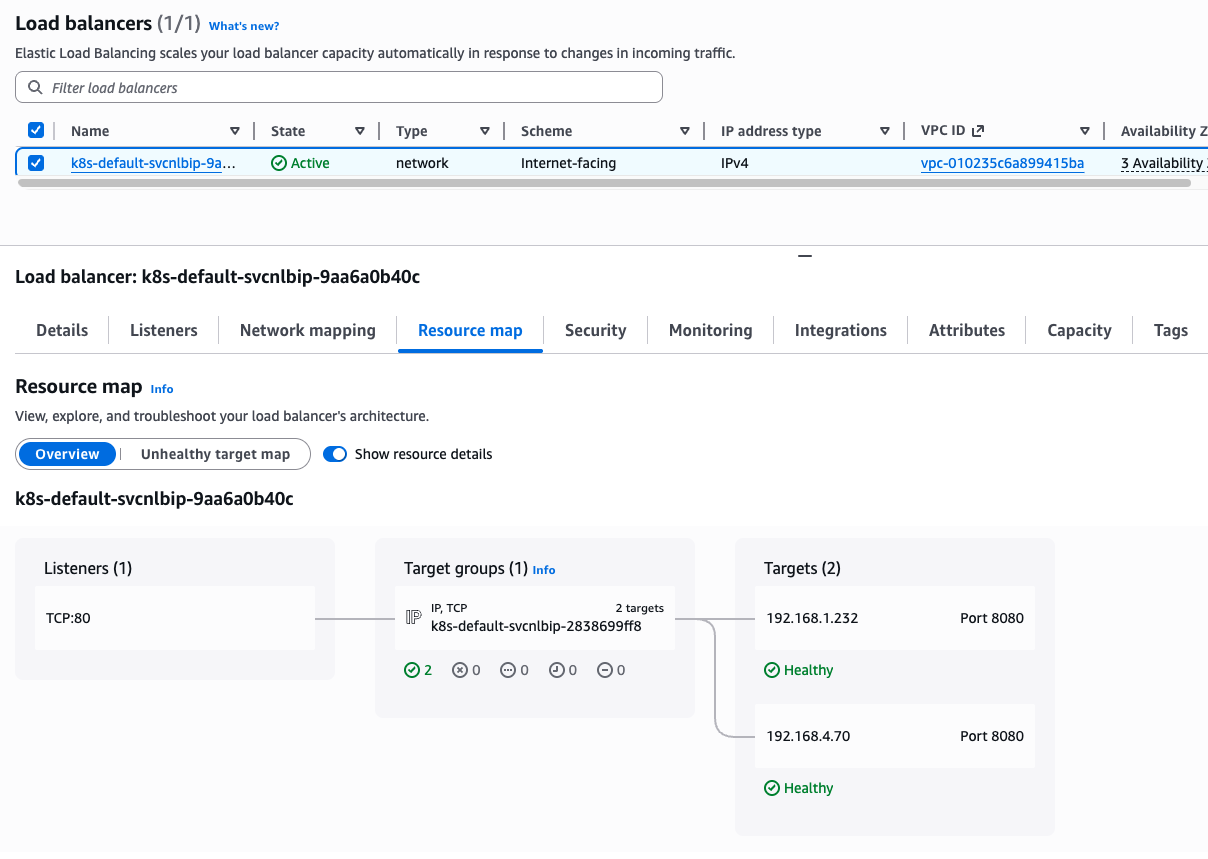
Note that two IP addresses on Targets are pod IP because we are using IP target mode(service.beta.kubernetes.io/aws-load-balancer-nlb-target-type: ip)
kubectl get targetgroupbindings
NAME                              SERVICE-NAME      SERVICE-PORT   TARGET-TYPE   AGE
k8s-default-svcnlbip-2838699ff8   svc-nlb-ip-type   80             ip            33m
targetgroupbindings indicates the svc-nlb-ip-type NLB sends traffic directly to the Pod IPs(TARGET-TYPE is ip).
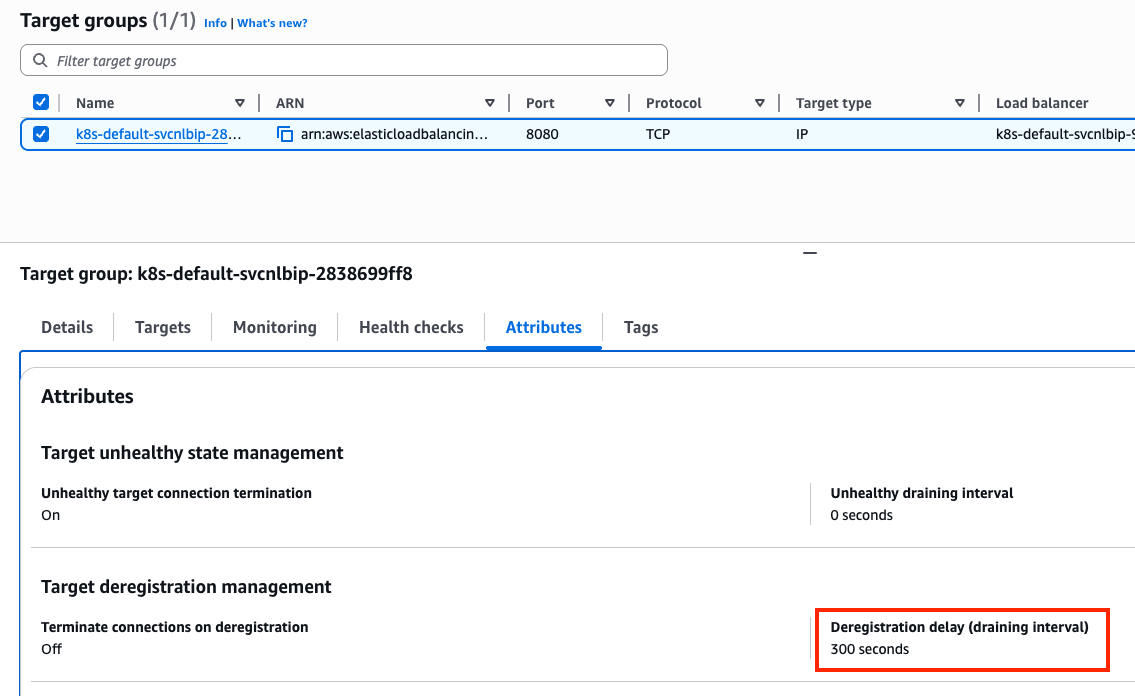
In a Network Load Balancer, the Deregistration Delay (also known as the draining interval) is the amount of time the balancer waits before it fully removes a target that has been marked as unhealthy or is being terminated. The default 300s is much longer than most Pods need to shut down. This can make your CI/CD pipelines feel “stuck” for 5 minutes during a rolling update as the old Pods wait to be fully removed from the NLB.
Let’s change the default value. Add the following annotation to svc-nlb-ip-type Service in echo-service-nlb.yaml file:
service.beta.kubernetes.io/aws-load-balancer-target-group-attributes: deregistration_delay.timeout_seconds=60

kubectl apply -f echo-service-nlb.yaml
Check NLB:
aws elbv2 describe-load-balancers | jq
aws elbv2 describe-load-balancers --query 'LoadBalancers[*].State.Code' --output text
ALB_ARN=$(aws elbv2 describe-load-balancers --query 'LoadBalancers[?contains(LoadBalancerName, `k8s-default-svcnlbip`) == `true`].LoadBalancerArn' | jq -r '.[0]')
aws elbv2 describe-target-groups --load-balancer-arn $ALB_ARN | jq
TARGET_GROUP_ARN=$(aws elbv2 describe-target-groups --load-balancer-arn $ALB_ARN | jq -r '.TargetGroups[0].TargetGroupArn')
aws elbv2 describe-target-health --target-group-arn $TARGET_GROUP_ARN | jq
Check load balancing:
NLB=$(kubectl get svc svc-nlb-ip-type -o jsonpath='{.status.loadBalancer.ingress[0].hostname}')
curl -s $NLB
for i in {1..100}; do curl -s $NLB | grep Hostname ; done | sort | uniq -c | sort -nr
  55 Hostname: deploy-echo-7549f6d6d8-8bxkk
  45 Hostname: deploy-echo-7549f6d6d8-s89mv
Delete resources:
kubectl delete deploy deploy-echo; kubectl delete svc svc-nlb-ip-type