04 EKS Networking Lab: Scaling Pod IPs with VPC CNI
This page is the personal study note and codebase written during the EKS group study led by Jongho S.
This lab is the continuation of 03 EKS Networking Lab: Routing and Interfaces. You need to provision an EKS cluster by following the instruction described here.
1. AWS VPC CNI Configuration Change
Check the current environment of aws-node DaemonSet:
kubectl get ds aws-node -n kube-system -o json | jq '.spec.template.spec.containers[0].env'
...
  {
    "name": "WARM_ENI_TARGET",
    "value": "1"
  },
...
Turn off WARM_ENI_TARGET and turn on WARM_IP_TARGET and MINIMUM_IP_TARGET in eks.tf:
  addons = {
    coredns = {
      most_recent = true
    }
    kube-proxy = {
      most_recent = true
    }
    vpc-cni = {
      most_recent = true
      before_compute = true
      configuration_values = jsonencode({
        env = {
          # WARM_ENI_TARGET = "1" # 현재 ENI 외에 여유 ENI 1개를 항상 확보
          WARM_IP_TARGET  = "5" # 현재 사용 중인 IP 외에 여유 IP 5개를 항상 유지, 설정 시 WARM_ENI_TARGET 무시됨
          MINIMUM_IP_TARGET   = "10" # 노드 시작 시 최소 확보해야 할 IP 총량 10개
          #ENABLE_PREFIX_DELEGATION = "true"
          #WARM_PREFIX_TARGET = "1" # PREFIX_DELEGATION 사용 시, 1개의 여유 대역(/28) 유지
        }
      })
    }
  }
Terraform apply:
terraform plan
terraform apply -auto-approve
Confirm the changes in the console: EKS > addon > vpc-cni
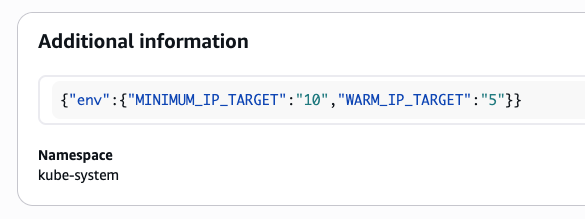
Check env in aws-node DaemonSet:
kubectl get ds aws-node -n kube-system -o json | jq '.spec.template.spec.containers[0].env'
kubectl describe ds aws-node -n kube-system | grep -E "WARM_IP_TARGET|MINIMUM_IP_TARGET"
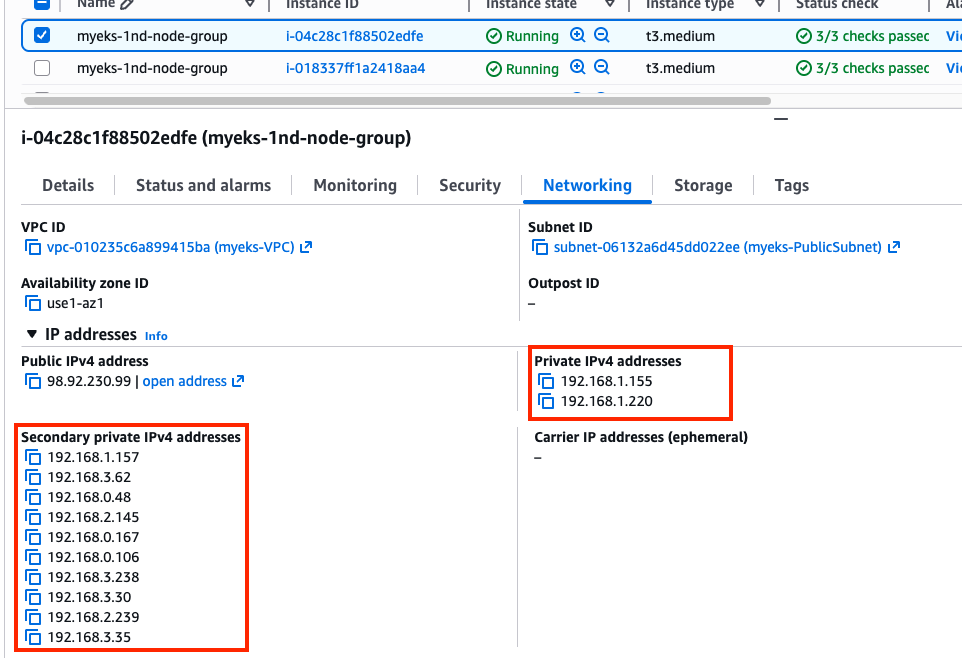
Confirm ENI is added to the node where no pods are scheduled. You can see that every node has both ens5 and ens6 network interface. Please refer to 4.1. Variable setting to secloud-native-aws-vpc-ct N1, N2, N3 variables.
for i in $N1 $N2 $N3; do echo ">> node $i <<"; ssh ec2-user@$i sudo ip -c addr; echo; done
That’s because of the MINIMUM_IP_TARGET = "10". Note that five secondary IP addresses are allocated per ENI in a warm pool.
Check cni logs:
for i in $N1 $N2 $N3; do echo ">> node $i <<"; ssh ec2-user@$i tree /var/log/aws-routed-eni ; echo; done
for i in $N1 $N2 $N3; do echo ">> node $i <<"; ssh ec2-user@$i sudo cat /var/log/aws-routed-eni/plugin.log | jq ; echo; done
for i in $N1 $N2 $N3; do echo ">> node $i <<"; ssh ec2-user@$i sudo cat /var/log/aws-routed-eni/ipamd.log | jq ; echo; done

# IpamD debugging commands  https://github.com/aws/amazon-vpc-cni-k8s/blob/master/docs/troubleshooting.md
for i in $N1 $N2 $N3; do echo ">> node $i <<"; ssh ec2-user@$i curl -s http://localhost:61679/v1/enis | jq; echo; done
2. Pod Count Constraints on Node
Install kube-ops-view:
helm repo add geek-cookbook https://geek-cookbook.github.io/charts/
helm install kube-ops-view geek-cookbook/kube-ops-view --version 1.2.2 --set service.main.type=NodePort,service.main.ports.http.nodePort=30000 --set env.TZ="America/New_York" --namespace kube-system
Confirm the kube-ops-view deployment:
kubectl get deploy,pod,svc,ep -n kube-system -l app.kubernetes.io/instance=kube-ops-view
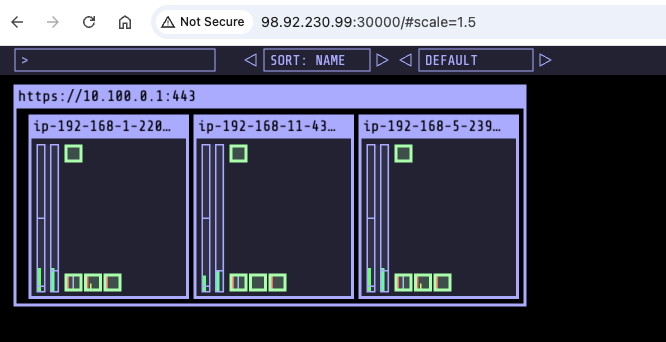
Load the webpage:
open "http://$N1:30000/#scale=1.5"
open "http://$N1:30000/#scale=1.3"
2.1. Pod Count Constraints for t3.medium Instance Type
The max pod count is determined by max ENI count per instance type and max secondary IP count per ENI. the max pod count can be calculated with the following:
(Number of network interfaces for the instance type) X (Number of IPs per network interface - 1) + 2
Note:
- The reason one is subtracted from the number of IPs per network interface is one IP address should be allocated to the network interface.
- The reason two is added is for taking
aws-nodeandkube-proxypods into the calculation. They are using the host IP address, not requiring a new IP address.
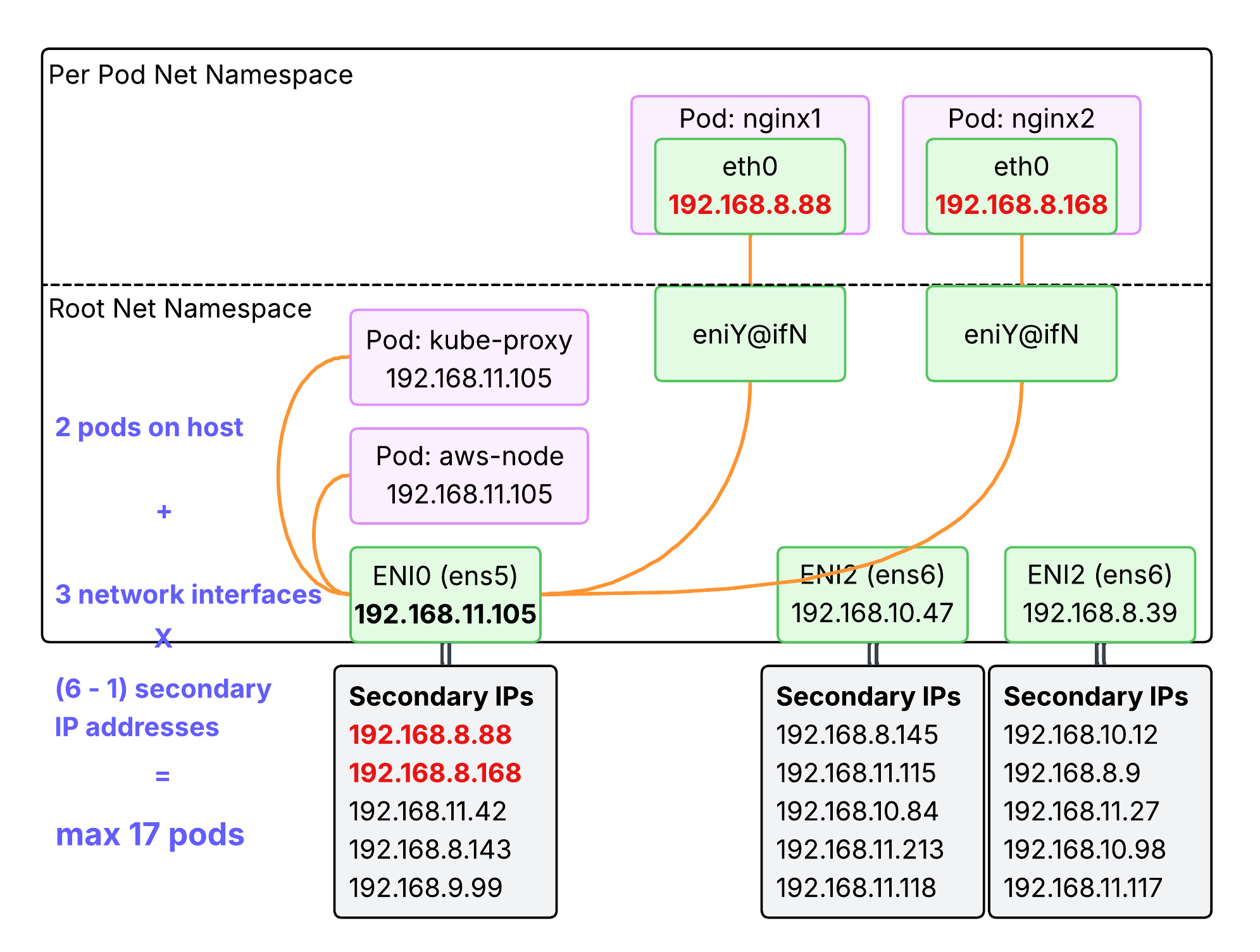
Taking t3.medium as an example:
- Number of network interfaces for the instance type = 3
- Number of secondary IPs per network interface = 6
- Max pod count = 3 x (6 - 1) + 2 = 17
Confirm the max allocatable pod count:
kubectl describe node | grep Allocatable: -A6
Allocatable:
  cpu:                1930m
  ephemeral-storage:  18181869946
  hugepages-1Gi:      0
  hugepages-2Mi:      0
  memory:             3371436Ki
  pods:               17
2.2. Pod Count Constraints for Other Instance Type
Check t3 instance types:
aws ec2 describe-instance-types --filters Name=instance-type,Values=t3.\* \
 --query "InstanceTypes[].{Type: InstanceType, MaxENI: NetworkInfo.MaximumNetworkInterfaces, IPv4addr: NetworkInfo.Ipv4AddressesPerInterface}" \
 --output table

 --------------------------------------
|        DescribeInstanceTypes       |
+----------+----------+--------------+
| IPv4addr | MaxENI   |    Type      |
+----------+----------+--------------+
|  15      |  4       |  t3.2xlarge  |
|  15      |  4       |  t3.xlarge   |
|  6       |  3       |  t3.medium   |
|  12      |  3       |  t3.large    |
|  2       |  2       |  t3.micro    |
|  2       |  2       |  t3.nano     |
|  4       |  3       |  t3.small    |
+----------+----------+--------------+
Check c5 instance types:
aws ec2 describe-instance-types --filters Name=instance-type,Values=c5\*.\* \
 --query "InstanceTypes[].{Type: InstanceType, MaxENI: NetworkInfo.MaximumNetworkInterfaces, IPv4addr: NetworkInfo.Ipv4AddressesPerInterface}" \
 --output table

-----------------------------------------
|         DescribeInstanceTypes         |
+----------+----------+-----------------+
| IPv4addr | MaxENI   |      Type       |
+----------+----------+-----------------+
|  50      |  15      |  c5ad.24xlarge  |
|  10      |  3       |  c5d.large      |
|  15      |  4       |  c5n.2xlarge    |
|  30      |  8       |  c5ad.4xlarge   |
...
2.3. Lab - Deploy max pods (Default ENI-based)
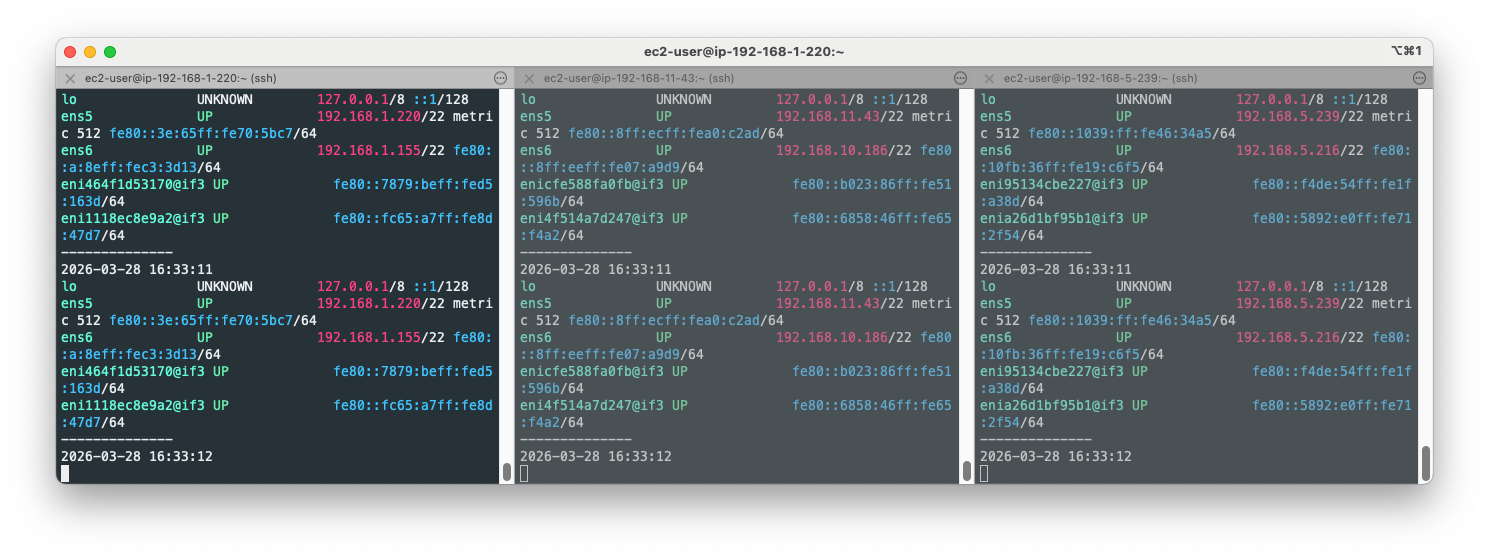
How maxPods is determined introduces the order of precedence for maxPods. In this lab, we are attempting to confirm Default ENI-based calculation. Open your terminal on each node and run ip addr show command:
ssh ec2-user@$N1
while true; do ip -br -c addr show && echo "--------------" ; date "+%Y-%m-%d %H:%M:%S" ; sleep 1; done

ssh ec2-user@$N2
while true; do ip -br -c addr show && echo "--------------" ; date "+%Y-%m-%d %H:%M:%S" ; sleep 1; done

ssh ec2-user@$N3
while true; do ip -br -c addr show && echo "--------------" ; date "+%Y-%m-%d %H:%M:%S" ; sleep 1; done
Open another terminal and watch pods:
watch -d 'kubectl get pods -o wide'
Open another terminal and deploy pods:
cat <<EOF | kubectl apply -f -
apiVersion: apps/v1
kind: Deployment
metadata:
  name: nginx-deployment
  labels:
    app: nginx
spec:
  replicas: 3
  selector:
    matchLabels:
      app: nginx
  template:
    metadata:
      labels:
        app: nginx
    spec:
      containers:
      - name: nginx
        image: nginx:alpine
        ports:
        - containerPort: 80
EOF
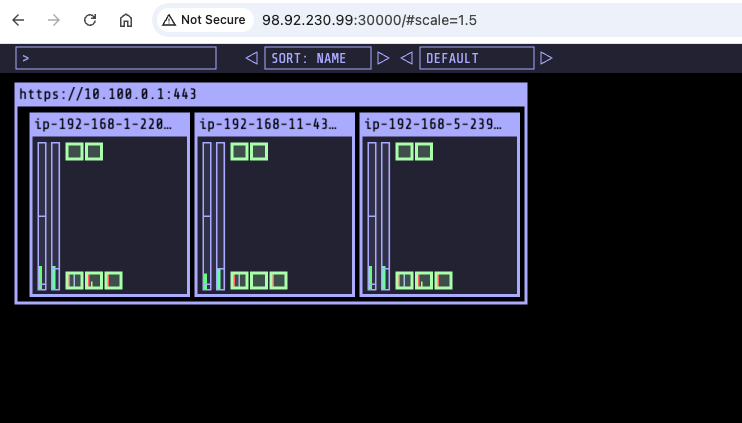
Confirm those pods are deployed:
Every 2.0s: kubectl get pods -o wide                                                                                                     MacBookPro: Sat Mar 28 12:40:12 2026
                                                                                                                                                                in 2.301s (0)
NAME                               READY   STATUS    RESTARTS   AGE     IP               NODE                            NOMINATED NODE   READINESS GATES
netshoot-pod-64fbf7fb5-56nnb       1/1     Running   0          35h     192.168.0.106    ip-192-168-1-220.ec2.internal   <none>           <none>
netshoot-pod-64fbf7fb5-bqrdj       1/1     Running   0          35h     192.168.7.161    ip-192-168-5-239.ec2.internal   <none>           <none>
netshoot-pod-64fbf7fb5-nhdrk       1/1     Running   0          35h     192.168.8.207    ip-192-168-11-43.ec2.internal   <none>           <none>
nginx-deployment-54fc99c8d-7psbm   1/1     Running   0          3m34s   192.168.5.5      ip-192-168-5-239.ec2.internal   <none>           <none>
nginx-deployment-54fc99c8d-nnq8c   1/1     Running   0          3m34s   192.168.10.224   ip-192-168-11-43.ec2.internal   <none>           <none>
nginx-deployment-54fc99c8d-vnp77   1/1     Running   0          3m34s   192.168.1.157    ip-192-168-1-220.ec2.internal   <none>           <none>
Now let’s add more pods:
kubectl scale deployment nginx-deployment --replicas=8
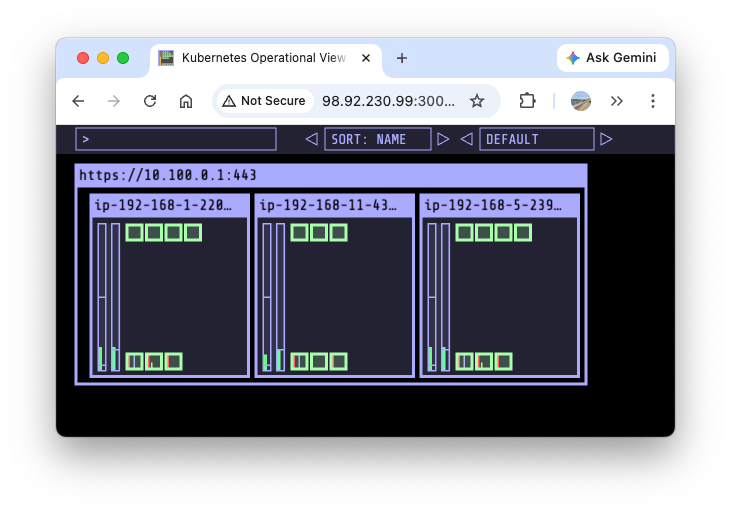
kubectl scale deployment nginx-deployment --replicas=15
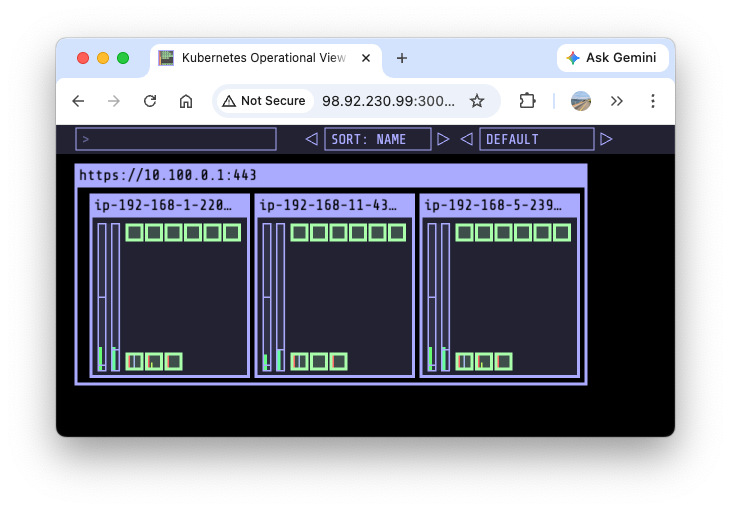
The third ENI(ens7) and veth are also created:
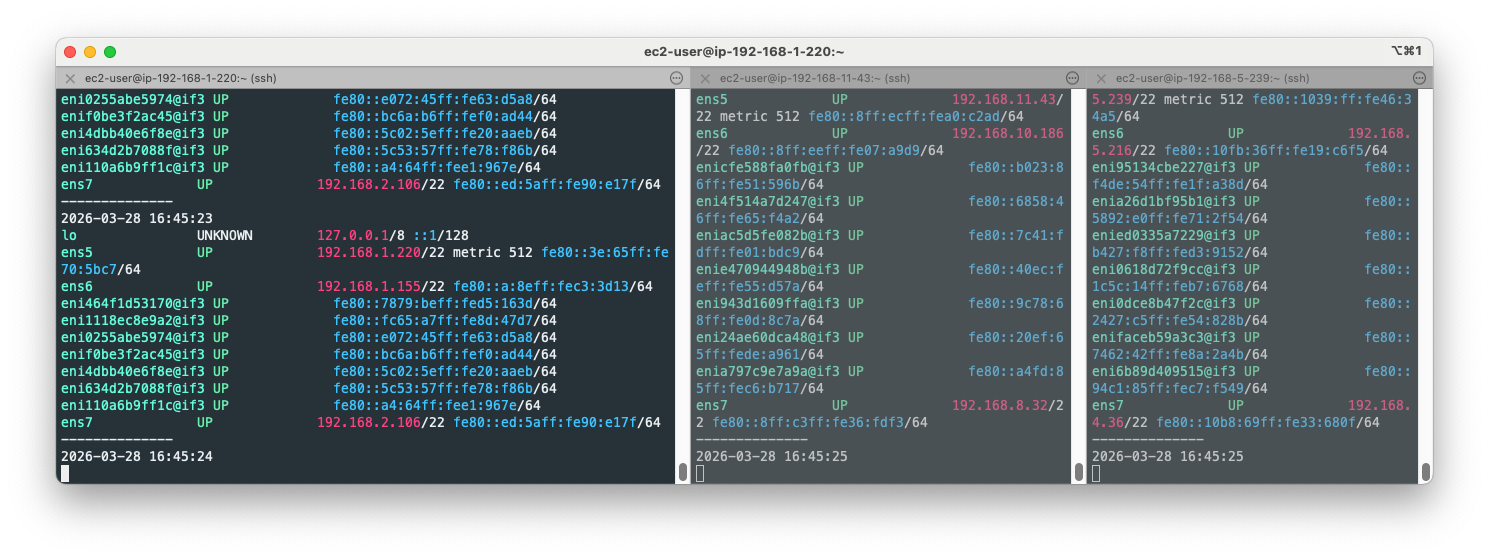
Let’s keep scaling up to 30:
kubectl scale deployment nginx-deployment --replicas=30
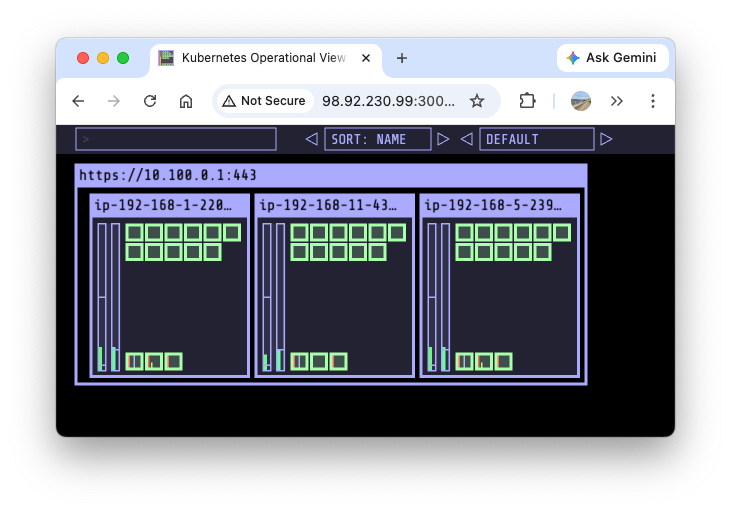
Some pods can’t be allocated due to IP address exhaustion:
kubectl scale deployment nginx-deployment --replicas=50
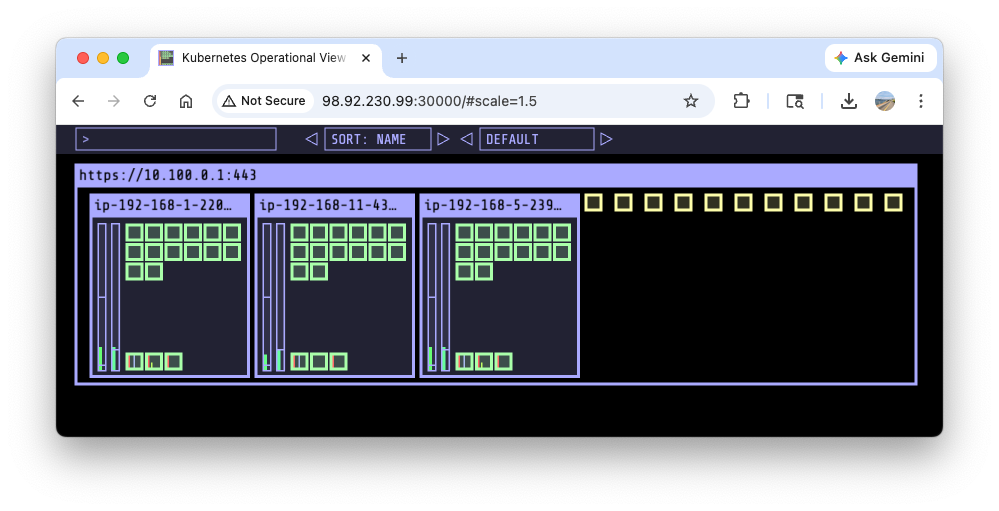
kubectl get pods | grep Pending
nginx-deployment-54fc99c8d-5k2gp   0/1     Pending   0          2m20s
nginx-deployment-54fc99c8d-5n7qm   0/1     Pending   0          2m21s
nginx-deployment-54fc99c8d-5tmx6   0/1     Pending   0          2m21s
nginx-deployment-54fc99c8d-bpvll   0/1     Pending   0          2m21s
nginx-deployment-54fc99c8d-cngvc   0/1     Pending   0          2m20s
nginx-deployment-54fc99c8d-cpqqk   0/1     Pending   0          2m21s
nginx-deployment-54fc99c8d-csqbl   0/1     Pending   0          2m20s
nginx-deployment-54fc99c8d-jr7v4   0/1     Pending   0          2m21s
nginx-deployment-54fc99c8d-lwhtl   0/1     Pending   0          2m20s
nginx-deployment-54fc99c8d-rh9rw   0/1     Pending   0          2m21s
nginx-deployment-54fc99c8d-rpnpt   0/1     Pending   0          2m20s
Check event logs:
kubectl events
...
3m31s                  Warning   FailedScheduling    Pod/nginx-deployment-54fc99c8d-5n7qm    0/3 nodes are available: 3 Too many pods. no new claims to deallocate, preemption: 0/3 nodes are available: 3 No preemption victims found for incoming pod.
...
Check cni logs:
for i in $N1 $N2 $N3; do echo ">> node $i <<"; ssh ec2-user@$i tree /var/log/aws-routed-eni; echo; done
for i in $N1 $N2 $N3; do echo ">> node $i <<"; ssh ec2-user@$i sudo cat /var/log/aws-routed-eni/plugin.log | jq ; echo; done
for i in $N1 $N2 $N3; do echo ">> node $i <<"; ssh ec2-user@$i sudo cat /var/log/aws-routed-eni/ipamd.log | jq ; echo; done
...
{
  "level": "debug",
  "ts": "2026-03-27T10:44:12.451Z",
  "caller": "ipamd/ipamd.go:1624",
  "msg": "Found prefix pool count 0 for eni eni-0f2231da7b2f29b4b\n"
}
...
IpamD debugging commands: https://github.com/aws/amazon-vpc-cni-k8s/blob/master/docs/troubleshooting.md
for i in $N1 $N2 $N3; do echo ">> node $i <<"; ssh ec2-user@$i curl -s http://localhost:61679/v1/enis | jq; echo; done | grep -E 'node|TotalIPs|AssignedIPs'
>> node 98.92.230.99 <<
    "TotalIPs": 15,
    "AssignedIPs": 15,
>> node 34.228.20.240 <<
    "TotalIPs": 15,
    "AssignedIPs": 15,
>> node 3.95.16.221 <<
    "TotalIPs": 15,
    "AssignedIPs": 15,
Delete nginx pods:
kubectl delete deploy nginx-deployment
2.4. Lab - Deploy max pods (managed node group enforcement)
This lab will implement *managed node group enforcement** described in How maxPods is determined to increase the max pod count per node. Max pod count is constrained by the number of allocatable IP addresses per node, which is determined by the AWS VPC CNI mode. The current VPC CNI mode is Secondary IP mode. To allocate more IPs(thus more pods), the mode should be switched to Prefix mode. To do so, your nodes must be AWS Nitro-based.
Check the instance type:
aws ec2 describe-instance-types --instance-types t3.medium --query "InstanceTypes[].Hypervisor"
[
    "nitro"
]
Modify eks.tf:
  addons = {
    coredns = {
      most_recent = true
    }
    kube-proxy = {
      most_recent = true
    }
    vpc-cni = {
      most_recent = true
      before_compute = true
      configuration_values = jsonencode({
        env = {
          # WARM_ENI_TARGET = "1" # 현재 ENI 외에 여유 ENI 1개를 항상 확보
          # WARM_IP_TARGET  = "5" # 현재 사용 중인 IP 외에 여유 IP 5개를 항상 유지, 설정 시 WARM_ENI_TARGET 무시됨
          # MINIMUM_IP_TARGET   = "10" # 노드 시작 시 최소 확보해야 할 IP 총량 10개
          ENABLE_PREFIX_DELEGATION = "true"
          #WARM_PREFIX_TARGET = "1" # PREFIX_DELEGATION 사용 시, 1개의 여유 대역(/28) 유지
        }
      })
    }
  }
Apply the modified terraform:
# monitoring
watch -d kubectl get pod -n kube-system -l k8s-app=aws-node
watch -d eksctl get addon --cluster myeks

# apply
terraform plan
terraform apply -auto-approve

# restart kube-system to apply the change
kubectl rollout restart -n kube-system deployment coredns
kubectl rollout restart -n kube-system deployment kube-ops-view
Confirm the changes:
# env in aws-node DaemonSet
kubectl get ds aws-node -n kube-system -o json | jq '.spec.template.spec.containers[0].env'
...
  {
    "name": "ENABLE_PREFIX_DELEGATION",
    "value": "true"
  },
 ...

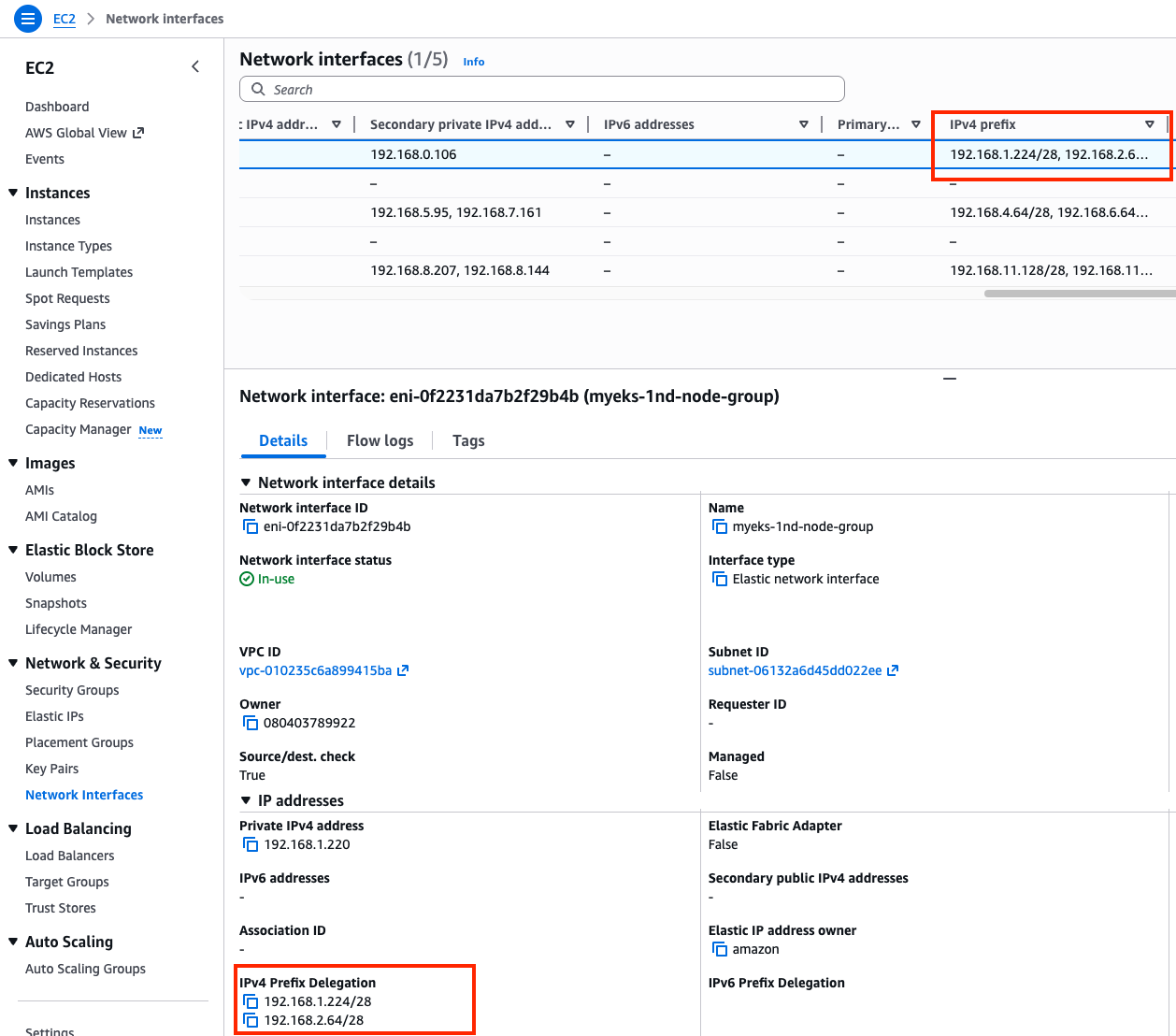
# IPv4 prefix
aws ec2 describe-instances --filters "Name=tag-key,Values=eks:cluster-name" "Name=tag-value,Values=myeks" \
  --query 'Reservations[*].Instances[].{InstanceId: InstanceId, Prefixes: NetworkInterfaces[].Ipv4Prefixes[]}' | jq
...
  {
    "InstanceId": "i-04c28c1f88502edfe",
    "Prefixes": [
      {
        "Ipv4Prefix": "192.168.1.224/28"
      },
      {
        "Ipv4Prefix": "192.168.2.64/28"
      }
    ]
  },
...
Confirm the change in console: EC2 > Network Interfaces
Monitor nodes:
ssh ec2-user@$N1
while true; do ip -br -c addr show && echo "--------------" ; date "+%Y-%m-%d %H:%M:%S" ; sleep 1; done

ssh ec2-user@$N2
while true; do ip -br -c addr show && echo "--------------" ; date "+%Y-%m-%d %H:%M:%S" ; sleep 1; done

watch -d 'kubectl get pods -o wide'
Deploy pods:
cat <<EOF | kubectl apply -f -
apiVersion: apps/v1
kind: Deployment
metadata:
  name: nginx-deployment
  labels:
    app: nginx
spec:
  replicas: 15
  selector:
    matchLabels:
      app: nginx
  template:
    metadata:
      labels:
        app: nginx
    spec:
      containers:
      - name: nginx
        image: nginx:alpine
        ports:
        - containerPort: 80
EOF
Confirm the number of pods has been increased:
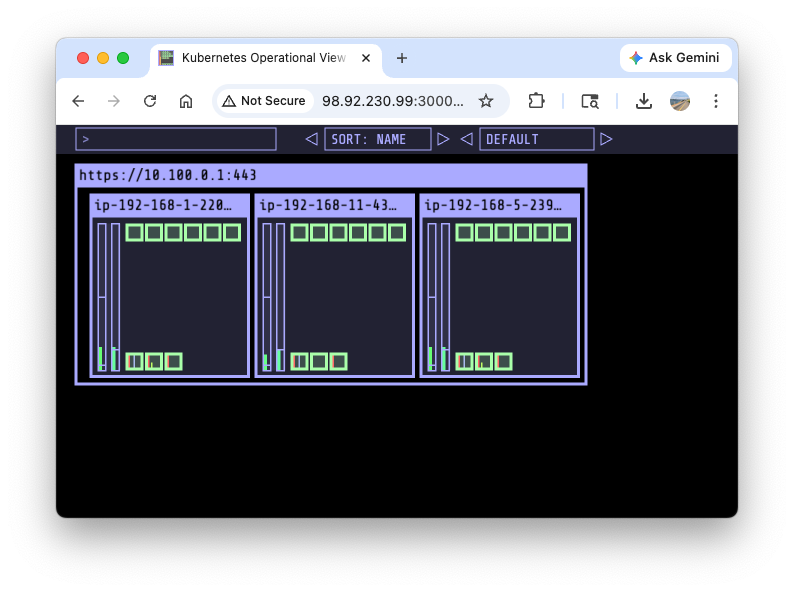
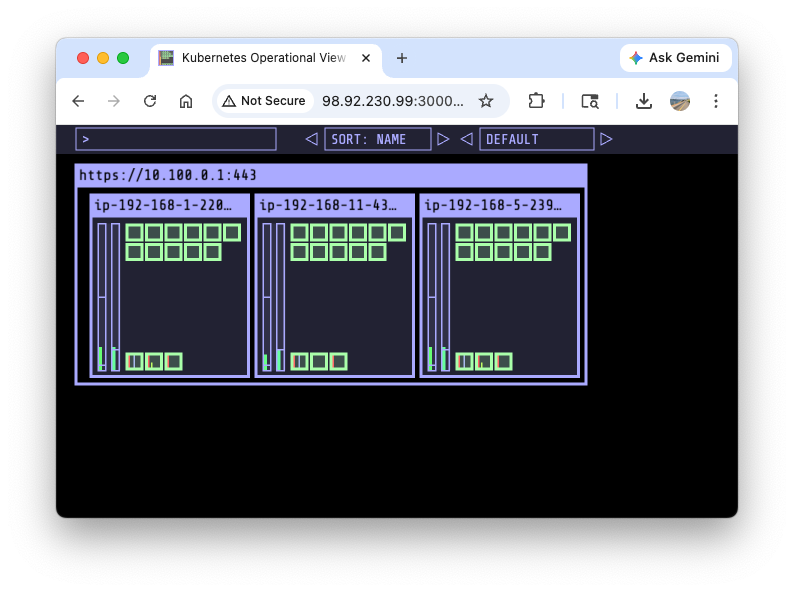
Increase the number of pods to 30:
kubectl scale deployment nginx-deployment --replicas=30
Increase the number of pods to 50:
kubectl scale deployment nginx-deployment --replicas=50
Pending pods are found unexpectedly:
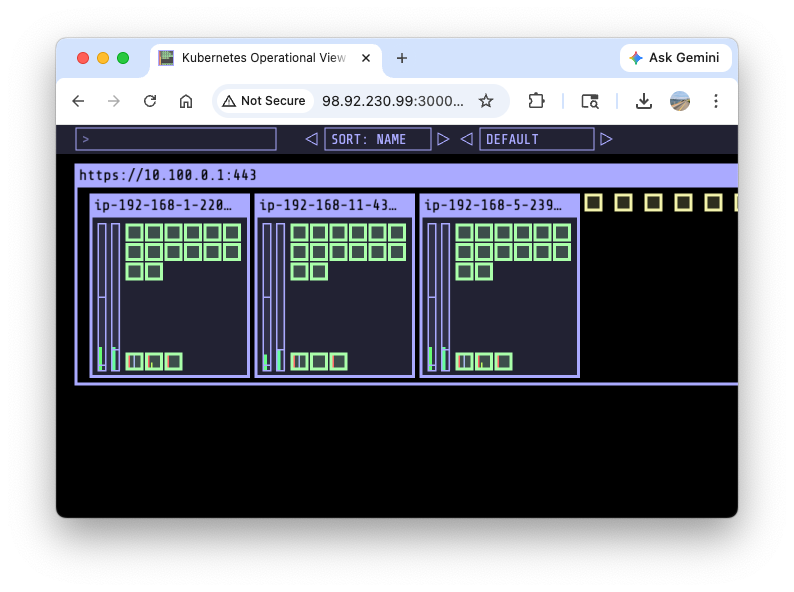
ipamd logs indicates more IPs can be allocated, confirming it is not the IP exhasution problem.
for i in $N1 $N2 $N3; do echo ">> node $i <<"; ssh ec2-user@$i curl -s http://localhost:61679/v1/enis | jq; echo; done | grep -E 'node|TotalIPs|AssignedIPs'
>> node 98.92.230.99 <<
    "TotalIPs": 33,
    "AssignedIPs": 15,
>> node 34.228.20.240 <<
    "TotalIPs": 34,
    "AssignedIPs": 15,
>> node 3.95.16.221 <<
    "TotalIPs": 34,
    "AssignedIPs": 15,
The max pod count is constrained by the maxPods variable set in kubelet:
while true; do kubectl describe node -l tier=primary | grep pods | uniq ; sleep 1; done
  pods:               17
  pods:               17
...
We are going to change maxPods variable. Set up monitoring again on each terminal:
while true; do kubectl describe node -l tier=primary | grep pods | uniq ; sleep 1; done
while true; do kubectl get pod | grep Pending | wc -l ; sleep 1; done
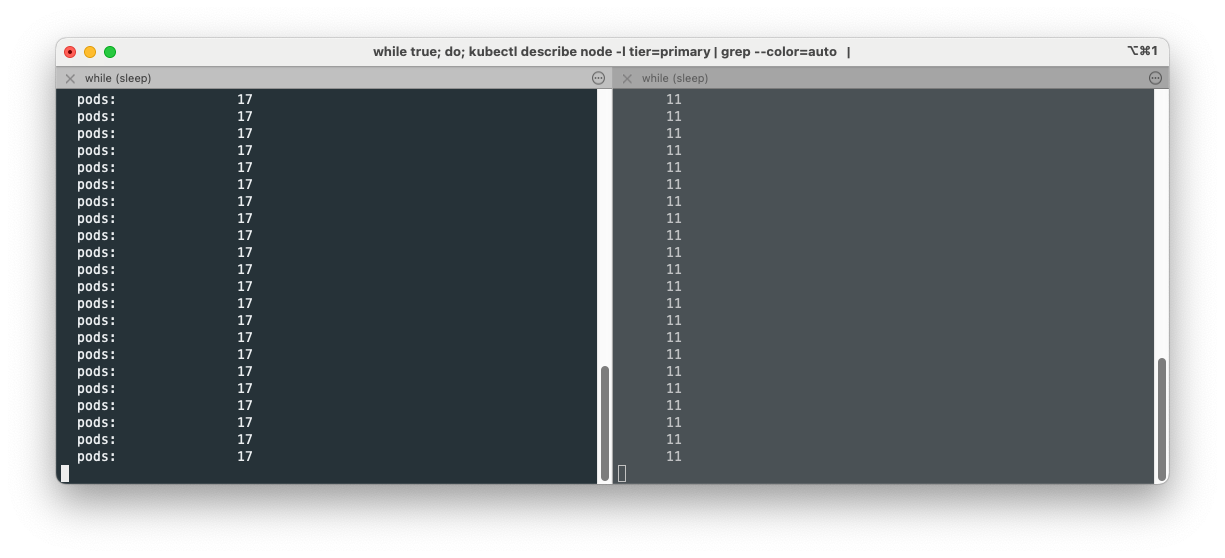
ssh to each worker node and modify maxPods temporarily:
cat /etc/kubernetes/kubelet/config.json | grep maxPods
    "maxPods": 17,

cat /etc/kubernetes/kubelet/config.json.d/40-nodeadm.conf | grep maxPods
    "maxPods": 17
Change maxPods to 50 using sed in the first node and restart the node to apply:
sudo sed -i 's/"maxPods": 17/"maxPods": 50/g' /etc/kubernetes/kubelet/config.json
sudo sed -i 's/"maxPods": 17/"maxPods": 50/g' /etc/kubernetes/kubelet/config.json.d/40-nodeadm.conf

# apply
sudo systemctl restart kubelet
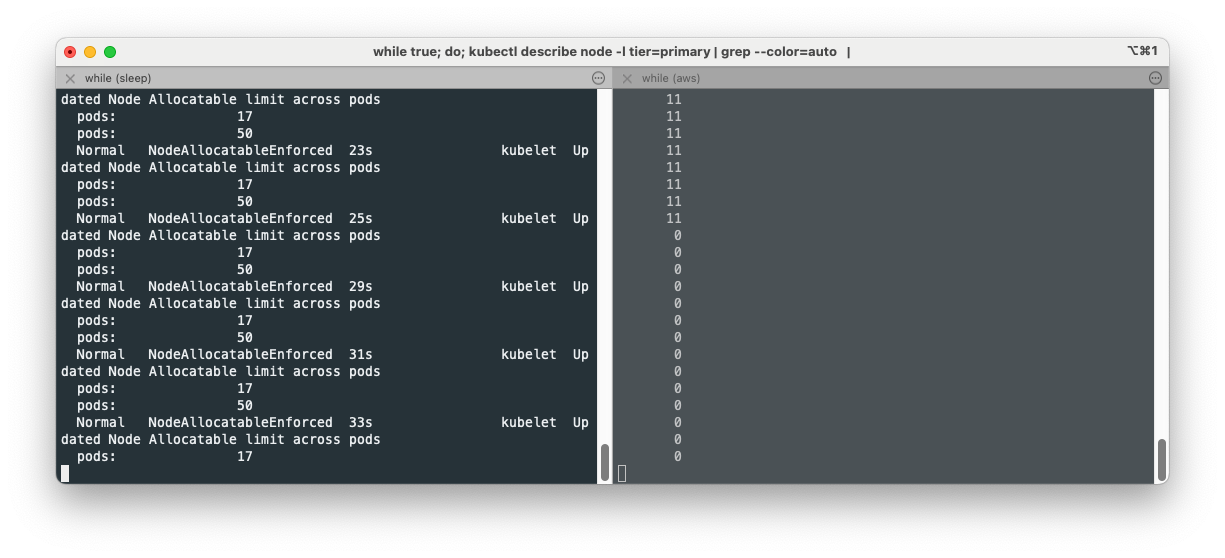
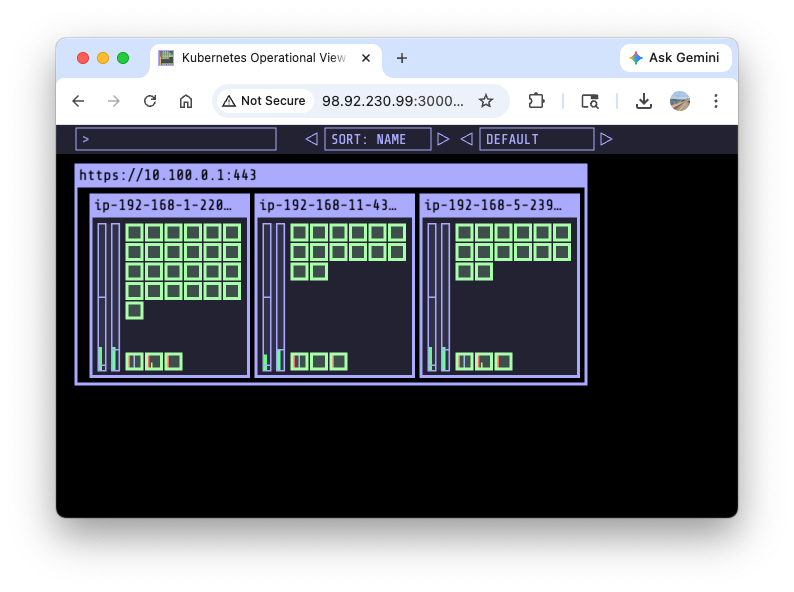
Confirm the pending pods are all scheduled at the node with maxPods of 50:
Delete nginx pods:
kubectl delete deploy nginx-deployment
Please refer to EKS Max-Pods Limit과 Prefix Mode PoC to modify the default maxPods variable in the provisioning time.