O1 Local Environment Setting and EKS Provisioning
This page is the personal study note and codebase written during the EKS group study led by Jongho S.
Summary
This guide provides a comprehensive walkthrough for setting up a local development environment, provisioning an Amazon EKS (Elastic Kubernetes Service) cluster using Terraform, and performing deep-dive inspections of the cluster components. You will learn how to configure essential CLI tools, deploy scalable infrastructure as code, and explore the low-level details of worker nodes, including containerd runtimes, CNI networking, and Kubelet configurations.
1. Local Environment Configurations
Install AWS CLI and configure IAM in your local environment using the below commands:
# install aws cli
brew install awscli
aws --version

# configure IAM on local env
aws configure
AWS Access Key ID : {your access key}
AWS Secret Access Key : {your secret key}
Default region name : us-east-1

# confirm
aws sts get-caller-identity
(Optional) If you want to create a EC2 key pair via AWS CLI, follow the commands:
# create a key pair
aws ec2 create-key-pair \
  --key-name my-keypair \
  --query 'KeyMaterial' \
  --output text > my-keypair.pem

# change access permission for the key pair
chmod 400 my-keypair.pem

# confirm
aws ec2 describe-key-pairs --key-names my-keypair
Install required tools to configure k8s
# Install kubectl
brew install kubernetes-cli
kubectl version --client=true

# Install Helm
brew install helm
helm version
Install recommended tools
# Install krew
brew install krew

# Install k9s
brew install k9s

# Install kube-ps1
brew install kube-ps1

# Install kubectx
brew install kubectx


# install kubecolor
brew install kubecolor
echo "alias k=kubectl" >> ~/.zshrc
echo "alias kubectl=kubecolor" >> ~/.zshrc
echo "compdef kubecolor=kubectl" >> ~/.zshrc

# add k8s krew path to PATH
export PATH="${KREW_ROOT:-$HOME/.krew}/bin:$PATH"
Install Terraform
# install tfenv
brew install tfenv

# check the tf versions to install
tfenv list-remote

# install the selected tf version
tfenv install 1.14.6

# declare the tf version to use
tfenv use 1.14.6

# check installed tf versions
tfenv list

# check the tf version info
terraform version

# configure auto complete
terraform -install-autocomplete

## add the following command to .zshrc
cat ~/.zshrc
autoload -U +X bashcompinit && bashcompinit
complete -o nospace -C /usr/local/bin/terraform terraform
2. Deploy EKS via Terraform Resources
Pull Terraform resources from repo:
# pull code
git clone https://github.com/gasida/aews.git
cd aews
tree aews

# move into 1w directory
cd 1w
Note that you should change default value for
TargetRegionandavailability_zonesto meet your needs. The default value is set toap-northeast-2.
Deploy EKS:
# donfigure tf vars
aws ec2 describe-key-pairs --query "KeyPairs[].KeyName" --output text
export TF_VAR_KeyName=$(aws ec2 describe-key-pairs --query "KeyPairs[].KeyName" --output text)
export TF_VAR_ssh_access_cidr=$(curl -s ipinfo.io/ip)/32 # ipinfo.io/ip returns your NAT Gateway IP
echo $TF_VAR_KeyName $TF_VAR_ssh_access_cidr # they override KeyName and ssh_access_cidr vars defined in var.tf

# deploy EKS, take ~12 mins
terraform init
terraform plan
nohup sh -c "terraform apply -auto-approve" > create.log 2>&1 &
tail -f create.log


# update ~/.kube/config
aws eks update-kubeconfig --region us-east-1 --name myeks

# confirm k8s config and rename context
cat ~/.kube/config
cat ~/.kube/config | grep current-context | awk '{print $2}'
kubectl config rename-context $(cat ~/.kube/config | grep current-context | awk '{print $2}') myeks
cat ~/.kube/config | grep current-context
3. Browse EKS Cluster Info
Control Plane:
# check eks cluster info
kubectl cluster-info

# check endpoint
CLUSTER_NAME=myeks
aws eks describe-cluster --name $CLUSTER_NAME | jq
...
      "endpointPublicAccess": true,
      "endpointPrivateAccess": false,
      "publicAccessCidrs": [
        "0.0.0.0/0"
       ...

aws eks describe-cluster --name $CLUSTER_NAME | jq -r .cluster.endpoint

## dig dns
APIDNS=$(aws eks describe-cluster --name $CLUSTER_NAME | jq -r .cluster.endpoint | cut -d '/' -f 3)
dig +short $APIDNS

curl -s ipinfo.io/13.125.96.102
"org": "AS16509 Amazon.com, Inc."
...

# check eks node group info
aws eks describe-nodegroup --cluster-name $CLUSTER_NAME --nodegroup-name $CLUSTER_NAME-node-group | jq
...
    "capacityType": "ON_DEMAND",
    "scalingConfig": {
      "minSize": 1,
      "maxSize": 4,
      "desiredSize": 2
    },
    "instanceTypes": [
      "t3.medium"
    ],
   ...
    "amiType": "AL2023_x86_64_STANDARD",
   ...

# check node info: os and container runtime
kubectl get node --label-columns=node.kubernetes.io/instance-type,eks.amazonaws.com/capacityType,topology.kubernetes.io/zone
kubectl get node --label-columns=node.kubernetes.io/instance-type
kubectl get node --label-columns=eks.amazonaws.com/capacityType # check node's capacityType
kubectl get node
kubectl get node -owide


# check auth info
kubectl get node -v=6
I0318 15:38:15.124533   42277 loader.go:405] Config loaded from file:  /Users/clicknam/.kube/config
...
I0318 15:38:16.750759   42277 round_trippers.go:632] "Response" verb="GET" url="https://A901F3A598F3C8673DC12A5E6B70093A.gr7.us-east-1.eks.amazonaws.com/api/v1/nodes?limit=500" status="200 OK" milliseconds=1596
...

cat ~/.kube/config
kubectl config view


## Get a token for authentication with an Amazon EKS cluster
AWS_DEFAULT_REGION=us-east-1
aws eks get-token help
aws eks get-token --cluster-name $CLUSTER_NAME --region $AWS_DEFAULT_REGION | jq
System pods:
kubectl get pod -n kube-system
kubectl get pod -n kube-system -o wide
kubectl get pod -A


# check all resources in kube-system
kubectl get deploy,ds,pod,cm,secret,svc,ep,endpointslice,pdb,sa,role,rolebinding -n kube-system

# check images for each pods
kubectl get pods --all-namespaces -o jsonpath="{.items[*].spec.containers[*].image}" | tr -s '[[:space:]]' '\n' | sort | uniq -c


# kube-proxy : iptables mode, bind 0.0.0.0, conntrack
kubectl describe pod -n kube-system -l k8s-app=kube-proxy
kubectl get cm -n kube-system kube-proxy -o yaml
kubectl get cm -n kube-system kube-proxy-config -o yaml


# coredns
kubectl describe pod -n kube-system -l k8s-app=kube-dns
kubectl get cm -n kube-system coredns -o yaml
kubectl get pdb -n kube-system coredns -o jsonpath='{.spec}' | jq


# aws-node: aws-node(cni plugin), aws-eks-nodeagent(network policy agent)
kubectl describe pod -n kube-system -l k8s-app=aws-node
Addons info:
# check the list of addons
aws eks list-addons --cluster-name myeks | jq
{
    "addons": [
        "coredns",
        "kube-proxy",
        "vpc-cni"
    ]
}

# check detailed info for a given addon
aws eks describe-addon --cluster-name myeks --addon-name vpc-cni | jq

# check detaild info for all addons
aws eks list-addons --cluster-name myeks \
| jq -r '.addons[]' \
| xargs -I{} aws eks describe-addon \
     --cluster-name myeks \
     --addon-name {}
4. Worker Nodes Info
ssh to worker nodes
# check node public IP and assign vars
aws ec2 describe-instances --query "Reservations[*].Instances[*].{PublicIPAdd:PublicIpAddress,PrivateIPAdd:PrivateIpAddress,InstanceName:Tags[?Key=='Name']|[0].Value,Status:State.Name}" --filters Name=instance-state-name,Values=running --output table
NODE1=13.124.172.105
NODE2=15.164.250.203

# ping to node IP
ping -c 1 $NODE1
ping -c 1 $NODE2

# check node security group
aws ec2 describe-security-groups | jq
aws ec2 describe-security-groups --filters "Name=tag:Name,Values=myeks-node-group-sg" | jq
aws ec2 describe-security-groups --filters "Name=tag:Name,Values=myeks-node-group-sg" --query 'SecurityGroups[*].IpPermissions' --output text


# ssh to worker node
ssh -i ~/.ssh/id_rsa -o StrictHostKeyChecking=no ec2-user@$NODE1 hostname
ssh -i ~/.ssh/id_rsa -o StrictHostKeyChecking=no ec2-user@$NODE2 hostname
ssh -o StrictHostKeyChecking=no ec2-user@$NODE1 hostname
ssh -o StrictHostKeyChecking=no ec2-user@$NODE2 hostname


# Tip. ssh config
cat ~/.ssh/config
...
Host *
    User ec2-user
    IdentityFile ~/.ssh/keypair.pem

ssh ec2-user@$NODE1
exit

ssh ec2-user@$NODE2
exit
Worker Node Specs
A worker node should meet the minimum spec requirements to account not just for your application’s requirements, but also for the overhead of Kubernetes system components (kubelet, container runtime) and AWS-specific DaemonSets (like the VPC CNI, kube-proxy, and CoreDNS). Let’s look around the current worker node specs.
First, switch to root user account:
sudo su -
whoami
Host Hardware, OS, and Kernel
The hostnamectl command provides a snapshot of the node’s system and hardware configuration. The Static hostname (ip-192-168-2-27.ec2.internal) acts as the node’s unique identifier within the Kubernetes cluster. This node is running Amazon Linux 2023 with a modern 6.12 Kernel, which provides native support for cgroup v2 and eBPF—essential features for modern container resource management and advanced networking. Finally, the t3.medium hardware model confirms the instance has 2 vCPU and 4 GB of RAM, satisfying the practical minimum requirements to comfortably run Kubernetes system components alongside your workloads.
hostnamectl
 Static hostname: ip-192-168-2-27.ec2.internal
       Icon name: computer-vm
         Chassis: vm 🖴
      Machine ID: ec2e166b60f2e04c0cdc1f8c30c171fa
         Boot ID: 64bbb6075c4a41bd90f809a4da1c3748
  Virtualization: amazon
Operating System: Amazon Linux 2023.10.20260216
     CPE OS Name: cpe:2.3:o:amazon:amazon_linux:2023
          Kernel: Linux 6.12.68-92.122.amzn2023.x86_64
    Architecture: x86-64
 Hardware Vendor: Amazon EC2
  Hardware Model: t3.medium
Firmware Version: 1.0
SELinux Configuraitons
The outputs from the getenforce and sestatus commands confirm that SELinux is enabled but operating in Permissive mode. Kubernetes recommends this configuration for worker nodes for the following reasons:
- Unrestricted Host Interaction: Containers frequently need to interact with the host filesystem—such as when configuring pod networking or mounting storage volumes. Strict SELinux policies can inadvertently block these essential operations.
- Kubelet Stability: If SELinux is set to
Enforcingmode, thekubeletmay encounter permission-denied errors when attempting to access the system resources required to provision and manage the container lifecycle. - Auditable Troubleshooting: In
Permissivemode, SELinux continues to monitor access and log policy violations, but it does not actively block the actions. This ensures smooth cluster operation while still providing administrators with valuable audit logs for troubleshooting and security analysis.
getenforce
Permissive

sestatus
SELinux status:                 enabled
SELinuxfs mount:                /sys/fs/selinux
SELinux root directory:         /etc/selinux
Loaded policy name:             targeted
Current mode:                   permissive
Mode from config file:          permissive
Policy MLS status:              enabled
Policy deny_unknown status:     allowed
Memory protection checking:     actual (secure)
Max kernel policy version:      33
Swap Space
Swap space is a designated portion of a computer’s physical storage drive (like an HDD or SSD) that the operating system uses as an extension of its physical RAM, when the RAM gets nearly full. The free -h and cat /etc/fstab commands confirm that swap space is completely disabled (0B) and will not be remounted upon reboot. Historically, the kubelet requires swap to be disabled to ensure predictable memory allocation; if a node runs out of memory, Kubernetes needs to accurately trigger Pod evictions rather than allowing the OS to silently swap memory to disk, which severely degrades performance.
free -h
               total        used        free      shared  buff/cache   available
Mem:           3.7Gi       343Mi       2.2Gi       1.0Mi       1.2Gi       3.2Gi
Swap:             0B          0B          0B


cat /etc/fstab
#
UUID=417dd49c-6f90-4edd-8517-c87dc5543f08     /           xfs    defaults,noatime  1   1
UUID=C42B-1BC6        /boot/efi       vfat    defaults,noatime,uid=0,gid=0,umask=0077,shortname=winnt,x-systemd.automount 0 2
Cgroup Version
the stat command checks the filesystem type for cgroups. The output cgroup2fs confirms the node is running cgroup v2. Kubernetes uses cgroups to enforce CPU and memory limits on containers, and cgroup v2 is the modern, unified standard required by recent Kubernetes releases for improved resource isolation and management.
# check cgroup: version 2
stat -fc %T /sys/fs/cgroup/
cgroup2fs # tmpfs if v1
Overlay
Confirm overlay kernel module is loaded. OverlayFS is a type of “union mount” filesystem, which allows you to take two different directories from different underlying filesystems and merge them together so they appear as a single, unified directory tree. It is arguably most famous for being the underlying storage technology that powers modern container runtimes like Docker, containerd, and Kubernetes.
# check overlay kernel module load. For more info: https://interlude-3.tistory.com/47
lsmod | grep overlay
overlay               217088  7
Containerd snapshot list
ctr -n k8s.io snapshots ls
ls -la /var/lib/containerd/io.containerd.snapshotter.v1.overlayfs/snapshots/
tree /var/lib/containerd/io.containerd.snapshotter.v1.overlayfs/snapshots/ -L 3
sysctl kernal networking params
The commands check the sysctl kernel parameters on the node, highlighting three critical configurations required for Kubernetes networking:
-
net.ipv4.ip_forward = 1: Enables IP forwarding. This turns the node into a router, allowing it to forward packets coming from the container network out to the external internet or other VPC subnets. -
net.bridge.bridge-nf-call-iptables = 1: Ensures that IPv4 traffic crossing network bridge interfaces is passed to the host’siptablesfor filtering and NAT. This is mandatory forkube-proxyto successfully route traffic to Kubernetes Services. -
net.bridge.bridge-nf-call-ip6tables = 1: Does the exact same thing as above, but for IPv6 network traffic, ensuring compatibility for dual-stack or IPv6-only clusters.
# check kernel params
tree /etc/sysctl.d/
cat /etc/sysctl.d/00-defaults.conf
cat /etc/sysctl.d/99-sysctl.conf
cat /etc/sysctl.d/99-amazon.conf
cat /etc/sysctl.d/99-kubernetes-cri.conf
net.bridge.bridge-nf-call-ip6tables = 1
net.bridge.bridge-nf-call-iptables = 1
net.ipv4.ip_forward = 1
Time sync
Time must be perfectly synced across all nodes in a cluster. These commands verify the chrony configuration and confirm the node is actively receiving time data from AWS’s internal NTP(Network Time Protocol) servers.
# check configs
grep "^[^#]" /etc/chrony.conf
tree /run/chrony.d/
/run/chrony.d/
├── amazon-pool.sources -> /usr/share/amazon-chrony-config/amazon-pool_aws.sources
└── link-local-ipv4.sources -> /usr/share/amazon-chrony-config/link-local-ipv4_unspecified.sources

# check time server pool
cat /usr/share/amazon-chrony-config/link-local-ipv4_unspecified.sources
# https://docs.aws.amazon.com/AWSEC2/latest/UserGuide/set-time.html
server 169.254.169.123 prefer iburst minpoll 4 maxpoll 4

cat /usr/share/amazon-chrony-config/amazon-pool_aws.sources
# Use Amazon Public NTP leap-second smearing time sources
# https://docs.aws.amazon.com/AWSEC2/latest/UserGuide/set-time.html#configure-time-sync
pool time.aws.com iburst

nslookup time.aws.com


# check status
timedatectl status

chronyc sources -v
MS Name/IP address         Stratum Poll Reach LastRx Last sample
===============================================================================
^* 169.254.169.123               3   4   377    13   -424ns[  -11us] +/-  427us
...
Containers
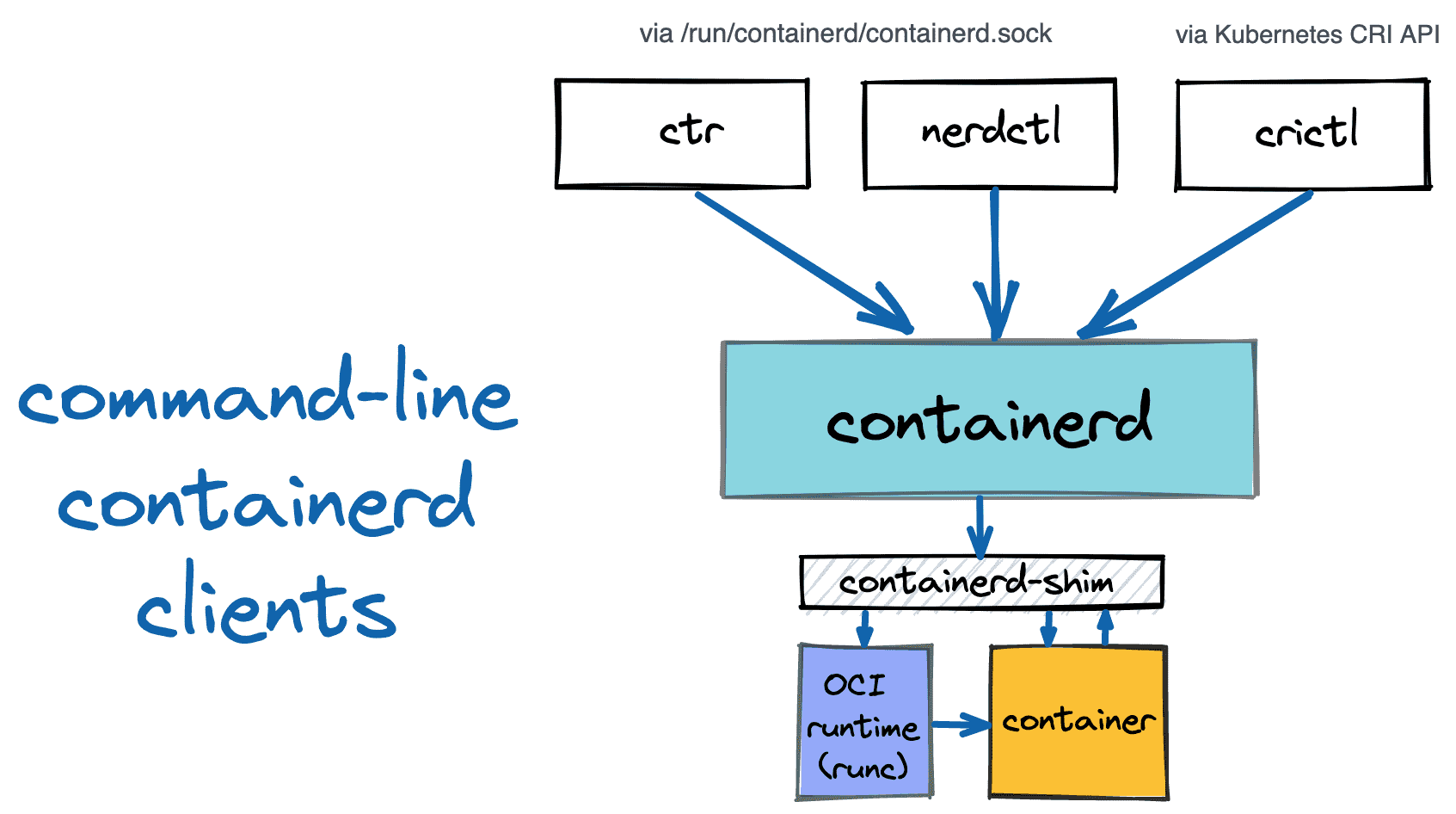
# check basic info
nerdctl info
...
Server:
 Server Version: 2.1.5
 Storage Driver: overlayfs
 Logging Driver: json-file
 Cgroup Driver: systemd
 Cgroup Version: 2
 Plugins:
  Log:     fluentd journald json-file none syslog
  Storage: native overlayfs
 ...

# check running containers
nerdctl ps
CONTAINER ID    IMAGE                                                                                             COMMAND                   CREATED         STATUS    PORTS    NAMES
9625f7e51edb    602401143452.dkr.ecr.us-east-1.amazonaws.com/eks/coredns:v1.13.2-eksbuild.3                       "/coredns -conf /etc…"    16 hours ago    Up                 k8s://kube-system/coredns-6d58b7d47c-7dwws/coredns
cd919f7b35d5    602401143452.dkr.ecr.us-east-1.amazonaws.com/eks/kube-proxy:v1.34.5-eksbuild.2                    "kube-proxy --v=2 --…"    16 hours ago    Up                 k8s://kube-system/kube-proxy-5x6gl/kube-proxy
bdac8651c34c    602401143452.dkr.ecr.us-west-2.amazonaws.com/eks/pause:3.10                                       "/pause"                  16 hours ago    Up                 k8s://kube-system/coredns-6d58b7d47c-7dwws
35489bb2cfea    602401143452.dkr.ecr.us-west-2.amazonaws.com/eks/pause:3.10                                       "/pause"                  16 hours ago    Up                 k8s://kube-system/kube-proxy-5x6gl
965d94c4c075    602401143452.dkr.ecr.us-east-1.amazonaws.com/amazon/aws-network-policy-agent:v1.3.1-eksbuild.1    "/controller --enabl…"    16 hours ago    Up                 k8s://kube-system/aws-node-4hmcx/aws-eks-nodeagent
b94c7a6a9eb6    602401143452.dkr.ecr.us-east-1.amazonaws.com/amazon-k8s-cni:v1.21.1-eksbuild.5                    "/app/aws-vpc-cni"        16 hours ago    Up                 k8s://kube-system/aws-node-4hmcx/aws-node
addd1c5666d7    602401143452.dkr.ecr.us-west-2.amazonaws.com/eks/pause:3.10                                       "/pause"                  16 hours ago    Up                 k8s://kube-system/aws-node-4hmcx

nerdctl images
nerdctl images | grep localhost
localhost/kubernetes/pause                                                      latest                76040a49ba6f    2 weeks ago     linux/amd64    737.3kB    318kB
localhost/kubernetes/pause                                                      latest                76040a49ba6f    2 weeks ago     linux/arm64    0B         265.6kB
Containerd
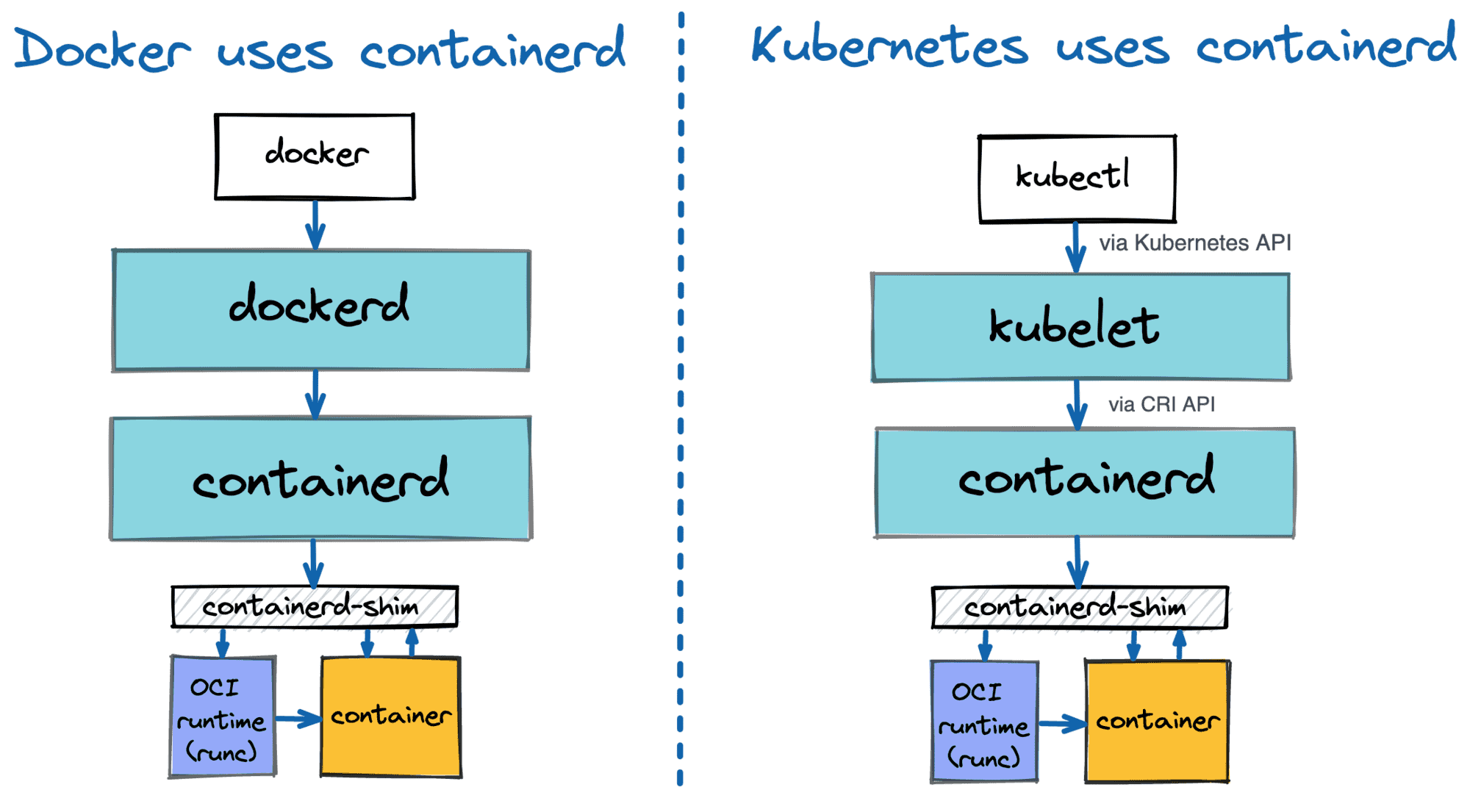
# check process
pstree -a
systemctl status containerd --no-pager -l
● containerd.service - containerd container runtime
     Loaded: loaded (/usr/lib/systemd/system/containerd.service; disabled; preset: disabled)
    Drop-In: /etc/systemd/system/containerd.service.d
             └─00-runtime-slice.conf

cat /usr/lib/systemd/system/containerd.service
[Service]
ExecStartPre=-/sbin/modprobe overlay
...
LimitNOFILE=infinity

# check containerd config files
tree /etc/containerd/
/etc/containerd/
├── base-runtime-spec.json
└── config.toml

# check daemon configs
cat /etc/containerd/config.toml
version = 3
root = "/var/lib/containerd"
state = "/run/containerd"

[grpc]
address = "/run/containerd/containerd.sock"

[plugins.'io.containerd.cri.v1.images']
discard_unpacked_layers = true

[plugins.'io.containerd.cri.v1.images'.pinned_images]
sandbox = "localhost/kubernetes/pause"

[plugins."io.containerd.cri.v1.images".registry]
config_path = "/etc/containerd/certs.d:/etc/docker/certs.d"

[plugins.'io.containerd.cri.v1.runtime']
enable_cdi = true

[plugins.'io.containerd.cri.v1.runtime'.containerd]
default_runtime_name = "runc"

[plugins.'io.containerd.cri.v1.runtime'.containerd.runtimes.runc]
runtime_type = "io.containerd.runc.v2"
base_runtime_spec = "/etc/containerd/base-runtime-spec.json"

[plugins.'io.containerd.cri.v1.runtime'.containerd.runtimes.runc.options]
BinaryName = "/usr/sbin/runc"
SystemdCgroup = true

[plugins.'io.containerd.cri.v1.runtime'.cni]
bin_dir = "/opt/cni/bin"
conf_dir = "/etc/cni/net.d"


# check OCI runtime spec
cat /etc/containerd/base-runtime-spec.json  | jq
...
    "namespaces": [
      {
        "type": "ipc"
      },
      {
        "type": "mount"
      },
      {
        "type": "network"
      },
      {
        "type": "pid"
      },
      {
        "type": "uts"
      }
    ],
    ...
"process": {
    ...
    "cwd": "/",               # default working directory for container process
    "noNewPrivileges": true,  # block container process from getting more power: setuid binaries stop working
    "rlimits": [
      {
        "type": "RLIMIT_NOFILE", # limit file descriptor: default → 65536 , max → 1048576
        "soft": 65536,
        "hard": 1048576
      }
    ],
    "user": {                 # default user for container process
      "gid": 0,
      "uid": 0
    }
...

# check unix domain socket for containerd: used by kubelt, also used by containerd clients(ctr, nerdctr, crictl)
containerd config dump | grep -n containerd.sock
ls -l /run/containerd/containerd.sock
ss -xl | grep containerd
ss -xnp | grep containerd

# check plugins
ctr --address /run/containerd/containerd.sock version
ctr plugins ls
TYPE                                      ID                       PLATFORMS         STATUS
io.containerd.content.v1                  content                  -                 ok     # store image layer
...
io.containerd.snapshotter.v1              native                   linux/arm64/v8    ok
io.containerd.snapshotter.v1              overlayfs                linux/arm64/v8    ok     # k8s default snapshotter
io.containerd.snapshotter.v1              zfs                      linux/arm64/v8    skip
...
io.containerd.metadata.v1                 bolt                     -                 ok     # metadata DB (bolt)
Check Kubelet Info:
# check process
ps afxuwww
systemctl status kubelet --no-pager
cat /etc/systemd/system/kubelet.service

# check files
tree /etc/kubernetes/
/etc/kubernetes/
├── kubelet
│   ├── config.json
│   └── config.json.d
│       └── 40-nodeadm.conf
├── manifests               # no static pod
└── pki
    └── ca.crt

# check k8s CA cert: valid for 10 years
cat /etc/kubernetes/pki/ca.crt | openssl x509 -text -noout
        Issuer: CN=kubernetes
        Validity
            Not Before: Mar 18 03:45:51 2026 GMT
            Not After : Mar 15 03:50:51 2036 GMT
        Subject: CN=kubernetes

# check kubelet config files
cat /etc/kubernetes/kubelet/config.json | jq
...
  "cgroupDriver": "systemd",
  "cgroupRoot": "/",              # every k8s pod cgroup is created under this path
  ...
  "evictionHard": {               # pod eviction conditions
    "memory.available": "100Mi",
    "nodefs.available": "10%",
    "nodefs.inodesFree": "5%"
  },
  "featureGates": {
    "DynamicResourceAllocation": true,      # GPU / device plugin resource allocation
    "MutableCSINodeAllocatableCount": true, # dynamically adjusted CSI volume attach limit
    "RotateKubeletServerCertificate": true  # kubelet TLS cert auto rotation
  },
  ...
  "kubeReservedCgroup": "/runtime",
  "logging": {
    "verbosity": 2
  },
  "maxPods": 17,                  # determined by ENI + IP count
  "protectKernelDefaults": true,  # kubelet is not allowed to change node sysctl
  "providerID": "aws:///us-east-1b/i-0bef257dedc4486c6", # k8s node ↔ AWS instance mapping
  "readOnlyPort": 0,              # 10255 read-only
  ...
  "serializeImagePulls": false,   # increse pull image speed
  "serverTLSBootstrap": true,     # kube-apiserver auto issues kubelet TLS cert
   ...
  "systemReservedCgroup": "/system",


cat /etc/kubernetes/kubelet/config.json.d/40-nodeadm.conf
{
    "apiVersion": "kubelet.config.k8s.io/v1beta1",
    "clusterDNS": [
        "10.100.0.10"
    ],
    "kind": "KubeletConfiguration",
    "maxPods": 17

# check kubelet directory
tree /var/lib/kubelet -L 2
/var/lib/kubelet
├── actuated_pods_state
├── allocated_pods_state
├── checkpoints
├── cpu_manager_state
├── device-plugins
│   └── kubelet.sock
├── dra_manager_state
├── kubeconfig
├── memory_manager_state
├── pki
│   ├── kubelet-server-2026-03-18-03-55-31.pem
│   └── kubelet-server-current.pem -> /var/lib/kubelet/pki/kubelet-server-2026-03-18-03-55-31.pem
├── plugins
├── plugins_registry
├── pod-resources
│   └── kubelet.sock
└── pods
    ├── 64bbf315-5068-4caa-87a1-522b81fe939a
    ├── 830110f9-1d7e-4dd2-b20e-50fdfec55643
    └── bd2e6ef1-0c49-4ef7-835d-6dfc9e585be0

# kubelet(client) calls eks api server
cat /var/lib/kubelet/kubeconfig
---
apiVersion: v1
kind: Config
clusters:
  - name: kubernetes
    cluster:
      certificate-authority: /etc/kubernetes/pki/ca.crt
      server: https://A901F3A598F3C8673DC12A5E6B70093A.gr7.us-east-1.eks.amazonaws.com
current-context: kubelet
contexts:
  - name: kubelet
    context:
      cluster: kubernetes
      user: kubelet
users:
  - name: kubelet
    user:
      exec:
        apiVersion: client.authentication.k8s.io/v1beta1
        command: aws
        args:
          - "eks"
          - "get-token"
          - "--cluster-name"
          - "myeks"
          - "--region"
          - "us-east-1"

# TLS cert used when eks api server calls to kubelet
cat /var/lib/kubelet/pki/kubelet-server-current.pem | openssl x509 -text -noout
Certificate:
    Data:
        Version: 3 (0x2)
        Serial Number:
            24:04:e9:3e:c0:5b:62:e2:eb:2b:5c:cf:88:0f:a3:2f:df:fd:cd:3b
        Signature Algorithm: sha256WithRSAEncryption
        Issuer: CN=kubernetes
        Validity
            Not Before: Mar 18 03:51:00 2026 GMT
            Not After : May  2 03:51:00 2026 GMT
        Subject: O=system:nodes, CN=system:node:ip-192-168-2-27.ec2.internal
        Subject Public Key Info:
            Public Key Algorithm: id-ecPublicKey
                Public-Key: (256 bit)
                pub:
                    04:b8:4e:89:fb:2e:f5:56:e8:a3:8f:fb:b0:48:b1:
                    79:14:75:73:3d:fc:b7:97:48:58:d1:ec:47:29:6b:
                    9f:d7:5a:5e:c5:de:7d:db:06:e9:94:83:8b:a5:c9:
                    d8:37:b2:79:5b:db:53:bd:a7:97:77:5d:a8:37:90:
                    4b:d1:c3:37:39
                ASN1 OID: prime256v1
                NIST CURVE: P-256
        X509v3 extensions:
            X509v3 Key Usage: critical
                Digital Signature
            X509v3 Extended Key Usage:
                TLS Web Server Authentication
            X509v3 Basic Constraints: critical
                CA:FALSE
            X509v3 Subject Key Identifier:
                DA:79:8B:56:C3:7B:C8:61:2D:78:1B:F0:A8:06:79:A9:17:34:C0:4C
            X509v3 Authority Key Identifier:
                82:73:7D:37:AB:F7:BD:99:57:05:EE:64:47:E9:C6:0B:7F:28:9C:01
            X509v3 Subject Alternative Name:
                DNS:ec2-18-206-231-198.compute-1.amazonaws.com, DNS:ip-192-168-2-27.ec2.internal, IP Address:18.206.231.198, IP Address:192.168.2.27
    Signature Algorithm: sha256WithRSAEncryption
    Signature Value:
        d2:e5:dd:77:82:aa:ac:a5:67:2f:ba:5d:6e:cf:50:2c:e8:74:
        fd:27:71:a5:61:2e:93:80:0c:ec:4f:22:79:2c:af:3d:6a:b6:
        c8:5d:f6:40:de:91:76:98:db:2e:48:e0:d0:6e:44:24:25:40:
        13:a8:fc:cc:a8:2a:f0:87:4e:3f:c7:4c:1d:e6:a4:55:b6:a6:
        ce:25:58:36:0f:b3:f7:52:15:82:0a:6d:53:0c:8e:83:45:af:
        b0:7b:6b:54:74:f3:e6:85:0c:07:49:62:5b:d4:1e:ad:b7:2d:
        ad:1a:4b:93:c7:d5:22:94:b2:df:89:b8:4d:c0:f5:33:7f:a7:
        b4:2b:36:6e:39:92:75:ae:dd:27:ac:33:92:e4:07:b7:38:54:
        ba:c9:fe:52:de:65:aa:9b:f4:1a:08:93:2a:30:ba:52:85:4b:
        6f:56:ac:40:ed:a9:a1:3e:52:b7:a9:23:8f:2e:b8:b7:a2:69:
        10:7c:a8:d2:2d:64:b8:51:0b:ef:27:6c:ed:cf:bc:9e:0b:13:
        10:4a:9e:a3:49:db:79:4f:ac:d7:49:86:0c:1f:ac:31:e3:55:
        04:96:4e:c2:ea:c4:95:7a:97:81:f0:4e:5c:ac:b5:2a:f6:3f:
        b0:e2:be:86:48:fa:50:86:bd:04:eb:cf:46:fc:6a:72:f4:20:
        8e:34:3f:70

# checkcsr used to issue cert
kubectl get csr
CNI
Below commands verify the installation and configuration of the AWS VPC CNI plugin on the worker node. The binaries required to set up pod networking are located in /opt/cni/bin/, while the configuration file (/etc/cni/net.d/10-aws.conflist) acts as the instruction manual, telling the container runtime exactly how to assign AWS VPC IP addresses to newly created pods.
# check cni binary
tree -pug /opt/cni/
/opt/cni/bin/aws-cni -h
cat /opt/cni/bin/aws-cni-support.sh

# check aws vpc cni plugin config
tree /etc/cni
/etc/cni
└── net.d
    └── 10-aws.conflist

cat /etc/cni/net.d/10-aws.conflist | jq
Network Configurations
Inspect the low-level networking, routing, and firewall configurations on a worker node.
# check network config
ip route
ip addr # check eni and veth
lsns -t net

# check iptables rules
iptables -t nat -S
iptables -t filter -S
iptables -t mangle -S
Storage
lsblk
df -hT
findmnt
Cgroup Configurations
-
cgroup Version Validation: stat and findmnt confirm the system is utilizing cgroup v2, the modern Linux standard for resource management. -
Resource Hierarchy: The tree output illustrates the node’s resource slices. The kubelet carefully divides resources between the operating system (system.slice), Kubernetes overhead (runtime.slice), and your workloads (kubepods.slice). -
Monitoring: Tools likesystemd-cglsandsystemd-cgtopallow administrators to visualize and monitor the resource consumption of these specific control groups dynamically.
# check cgroup: version 2
stat -fc %T /sys/fs/cgroup/
findmnt |grep -i cgroup

# EKS node cgroup structure
tree /sys/fs/cgroup/ -L 1
...
/sys/fs/cgroup/
├─ system.slice                 ← systemReservedCgroup
│   ├─ sshd
│   ├─ journald
│   └─ systemd
│
├─ runtime.slice                ← kubeReservedCgroup
│   ├─ kubelet
│   ├─ containerd
│   └─ kube-proxy
│
└─ kubepods.slice               ← pods
     ├─ guaranteed
     ├─ burstable
     └─ besteffort

# associated tools
systemd-cgls
systemd-cgtop